I run OBS primarily to manage and display multiple demo devices attached to my Mac via USBC or HDMI capture card as well as capturing the built in display and then output through the virtual camera into Keynote Live video. Its worked as intended for years.
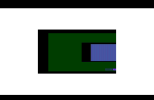
Recently, in OBS, the 'macOS Screen Capture' in the source preview looks fine and in Keynote, the live video preview looks fine as well. But as soon as I play the slideshow in keynote (either Play or Play in Window) the screen capture is broken. Black backgrounds are green and brighter parts of the image have vertical lines. Not sure how to describe how broken it is, but Ive attached an image.
All other sources are fine. Ive also discovered if I choose the "Display Capture" under the Deprecated sources it works fine.
Any idea of a fix or what could be causing this?
I have tried to replicate the issue on a different Mac running the same versions of software and have no issues. I have tried completely removing OBS and reinstalling.
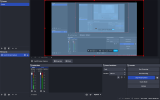
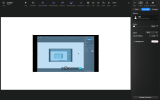
First screenshot is taken from a fresh install of OBS with all my original Scenes and Sources removed. Second screenshot is Keynote Live video preview.Third is what happens when I play the slideshow.
MacBook Pro M4 Max
macOS 26.3.1
OBS 32.1.0
Keynote 15.1.1
Recently, in OBS, the 'macOS Screen Capture' in the source preview looks fine and in Keynote, the live video preview looks fine as well. But as soon as I play the slideshow in keynote (either Play or Play in Window) the screen capture is broken. Black backgrounds are green and brighter parts of the image have vertical lines. Not sure how to describe how broken it is, but Ive attached an image.
All other sources are fine. Ive also discovered if I choose the "Display Capture" under the Deprecated sources it works fine.
Any idea of a fix or what could be causing this?
I have tried to replicate the issue on a different Mac running the same versions of software and have no issues. I have tried completely removing OBS and reinstalling.
First screenshot is taken from a fresh install of OBS with all my original Scenes and Sources removed. Second screenshot is Keynote Live video preview.Third is what happens when I play the slideshow.
MacBook Pro M4 Max
macOS 26.3.1
OBS 32.1.0
Keynote 15.1.1