
Virtual Cam output gets distorted and turns greenish

dtoux

New Member
I use the Virtual Webcam built into OBS 26.0 with MS teams and it works well for the most part. But, in some cases, the image the other party seeing turns greenish and distorted. If I stop sharing the video and resume again, the video is okay for a few seconds and then it turns green again.

I made a few observations but they are inconclusive:
- in many cases person on the other end uses Linux. but not always
- in other cases, the person on the other end has a relatively slow computer, but not always
- the internet latency seems has no effect

My uneducated guess is that maybe the combination of resolution and frame rate are too high. My output resolution is set to 720p30 in video settings but I don't think it has an effect on Webcam output. I also don't think that video from the webcam is compressed, so compression settings should make no difference. Please correct me if I'm wrong.

Any ideas on what may be causing this issue and if there is any solution or workaround?
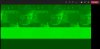
 
I have this exact same problem in Teams in Windows (OBS 26.0.2 64bit).

So far the only times I have seen it happen, one of the other users is using Linux - so while that seems a very strange and unlikely cause of the problem, I feel that since it is also what dtoux noticed I have to mention it!

Virtual Camera has been OK in Zoom and Jitsi - it's only in Teams I have noticed a problem.
 
It happens intermittently, so even on the same call I can restart the video several times and it may become stable after a few attempts. So, it may have something to do with bandwidth and the way Teams encodes video. Any clues on how I can find out the current resolution of the virtual cam and if there is a way to control it? A sample of the image is attached.
 

Attachments

  • image001.jpg
    image001.jpg
    144.2 KB · Views: 961
Last edited:
Hello,

We are talking about the same problem here:

I use Zoom, the problem is on the stream sent, no matter who
 
This all started for me after the December 8th Windows "update" . . . (a term I use loosely). After that I get the same issue. Not everyone sees the green, and not always When there are 2 to 4 people, some will see the green, but usually when there are 5 or more, no one does. The screen always looks perfectly fine for me.

This is not just THEIR issue. I am a teacher of the Deaf. I use OBS so they can see me and the work they need to do projected behind me. Please, if anyone has a fix, let me know. My job and the education of my students are LITERALLY at risk, here . . .
 
Hello, got the same issue! I expierienced it with OBS via Zoom (virtual cam) Was 100% stable before... It occured for the first time after Windows update. I foound out by myself, as soon as i turned of hardware accelaration at the Zoom video settings, "green screen" disapperad. For me it was solved, had some smaller "meetings" where I reproduced the issue and as soon as I unchecked the hardware acceleration green screen disapperad... Now I read in ohter threads that this also might be just a "temporary" solution... Tonight I have about 40 students to "teach" sports... I really hope everything goes well... Has anybody an idea how to permanently ban/resolve this bug? I also will keep you updated if I got news...
 
Hello again, I just wrote to official Zoom support and got (immidiately) following news. (Which I was allowed to share).

"
Thanks for contacting Zoom Technical Support!

I understand your concern regarding the green filter appearing on your video.

Regarding that, please know that this is a known issue that our engineering team is currently working to resolve. The issue is that a green overlay on camera view is being sent from the meeting host when on the Windows desktop client to the participants' clients.

The workaround right now is for the host of the meeting (who is on Windows client) to disable "use hardware acceleration for receiving video". There is no need to adjust any other settings aside from this one.

I hope this clarifies things for you. If there is anything else I can do for you or you have any further questions, feel free to let us know. "
 
Hello again, I just wrote to official Zoom support and got (immidiately) following news. (Which I was allowed to share).

"
Thanks for contacting Zoom Technical Support!

I understand your concern regarding the green filter appearing on your video.

Regarding that, please know that this is a known issue that our engineering team is currently working to resolve. The issue is that a green overlay on camera view is being sent from the meeting host when on the Windows desktop client to the participants' clients.

The workaround right now is for the host of the meeting (who is on Windows client) to disable "use hardware acceleration for receiving video". There is no need to adjust any other settings aside from this one.

I hope this clarifies things for you. If there is anything else I can do for you or you have any further questions, feel free to let us know. "
Thanks, It has worked for me at the moment, let's hope they solve it permanently
 
Registered here just to share my fix for this.

I'm using dual Logitech Rally cams and a Meetup and this issue was making OBS utterly unusable for me (which was a TERRIBLE shame).

For Microsoft Teams at least, the platform will only support 1920x1080 at 30fps. Hardcoding both of those settings for my cameras has made OBS rock solid and no more green screen of death!

YMMV, but I hope this helps someone.

1610654062966.png
 
I got the same issue. I'm on Windows 10 with latest OBS software and using the virtual cam oputput in MS Teams. It happens usually at the beginning of a meeting. Stopping and starting the virtual cam in OBS fixes the issue immediatly. I got the feeling that it is somehow related towards new participants joining the call in MS Teams.
The above mentioned configuration to 1920x1080 at 30 fps didn't solve my situation.

As it is quite anoying and other meeting participants get distructed I'm really looking for a fix.
 
A friend and I have been having the same issue with the OBS Virtual Camera video stream turning green at the beginning and at other times during a Microsoft Teams meeting. I will try some of the settings presented here and see if it fixes the issue.

I can say that during our testing (with many people on a conference) every time my friend "pinned" my video stream (made it full window), within 3 to 10 seconds, it would turn green. We verified this in many different conference calls. This would also follow why it turns green at the beginning of a meeting if you are the first person to join the video goes full window when the next person joins which is similar to "pinning" the video. When my friend would ignore my video stream it was fine and would not go green (except at the beginning of the call). Also, any one-on-one video calls cause the green to happen (which also follows the full window turns it green theory). Not sure there is a workaround for this theory as you can't control if someone decides to pin your video and I haven't found any settings to disallow this action.

Just thought I'd post what I found.
 
Dears,

I can prove it is still an issue with 26.1.1 (64bit) Windows where i got green screen after getting set full screen 3-10 seconds after switched to be on stream. I have the impression when it's a fresh Teams Live Event it not occurs very often, but if the meeting goes on it happens more often. Switching off/on cam is helping but not something you want to consider being presented to the attendees. Also leaving the Teams Life Event and restart OBS helped me a bit, but i also really seeking a relyable setup.

I tried to go with 720 also in hope it would make a difference, but it don't...
I for sure have no background effects applied.....

Hope it can help a bit to find this issue in combination with OBS/Teams

Thanks a bunch from munich.
 
Any other update on this? It just started happening to my team members pretty constantly. We've tried all the solutions through this thread.
 
I'm interested in any solution as well. Just ran into this last week, while messing with OBS/Teams for the first time.
 
I've seen this problem on different Systems, with very different Hardware. So i'm not sure how the HW-acceleration can be the reason. PCs are:
  • a 6 year old Laptop with I5 and Intel-graphics
  • a new Laptop with I7 and Intel-graphics
  • a Desktop with Threadripper+2080TI, which is very different to the others
All have Win10-64, but with different update-levels.
I have a lot meetings with the Laptops and i know that there are very different participants on the other side (Win 7 and 10, Macs, Linux, Laptops and Desktops)
I've seldom seen this green in zoom, but eventually the video was not able to start at all (just black)
I've seen this green-screen in Teams, Goto, and Skype but most of the time it works. Disabling camera and enabling again helps in most cases but sometimes it takes several retries.

The next thing i'll try is to use the NDI-route. That is to use the NDI-plugin for OBS as the output and the NDI-webcam (NDI-tools) in the meeting-messenger. I had never any issue when i've used that, but i've used it not so often and only with two PCs til now. (that was the reason for NDI for me)
 
I have disabled to GPU, but after 20 minutes I got this crazy greenish video in Teams while in OBS everyhing is fine, the preview is clear and nice. disabling the camera in teams and enabling starts all time with a good picture, but in a few minutes the green-webcam appears.
 
Am new to OBS as way of improving my Teams/Zoom backgrounds via virtual camera...which it does enormously, I love it - all the testing great, until my first work Teams call and I got this green screen of death exactly as described (had to bale out) - second call was OK, third it happened again. Now I don't feel I can trust it. Really hoping there's a reliable fix. I can't run as Admin (as suggested here) as it's a work machine, it was hard enough persuading them to install in the first place)
 
I've been experiencing this issue, on a Dell latitude 7400, intel cor v7 processor, 8th gen. I had 8GB of RAM, just upgraded to 16GB. OnBoard video. i do use a green screen. I've encountered this with the onBoard webcam and the external logitech streamcam.

I'm running OBS 26.1.1

It seems to happen intermittently - but a new wrinkle which I think may help.

In Teams, with the camera set to the OBS virtual camera, without the virtual camera started in OBS, this happened. So while it was just showing the OBS logo... it turned green and wonky as we experience. I can start/stop the camera to fix it but it can happen without OBS streaming, which makes me think it is an issue with the virtual camera.
 
Back
Top