Video recorded from Hi-8mm plays without media player controls

jillthefree

New Member
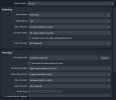
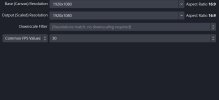
Hello. I recorded a movie from my Canon camera to MP4 using OBS. I must have used incorrect settings, because when I play it back in any media player, there are no player controls (seek, pause, etc.). All other movies open in media player with the controls.

Also, is there a way to upload to YouTube at the same time as I record from the camera, since that is my end goal? I am a newbie to OBS, so any guidance is very much appreciated. Thanks.
 

Attachments

  • video.JPG
    video.JPG
    27.9 KB · Views: 27
  • output.JPG
    output.JPG
    70.2 KB · Views: 30
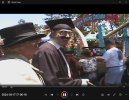
To clarify, I see the player controls, but the seek bar does not work. It is grayed out, but the time counter works. The Next and Prev buttons start the video over. The only button that functions is the Play/Pause.
 

Attachments

  • media2.JPG
    media2.JPG
    104.3 KB · Views: 20
Try "mpv player", in some cases it works better.

As for uploading to some online service - it is better to do it manually from the web interface of the service itself (or in other way that this service recommends).
 
Try "mpv player", in some cases it works better.

As for uploading to some online service - it is better to do it manually from the web interface of the service itself (or in other way that this service recommends).
Thanks Suslik V. With mpv player, I can now utilize the seek bar, but it does not allow play/pause. The issue must be with the way I recorded the video into OBS, because my other videos don't have the problem with player controls. Do you have any thoughts on how to correct my settings in OBS?
 
Back
Top