Not when streaming/streaming because I'm just using this to stream to discord using the fullscreen projector, would two pass cause that?Does this happen when you're not recording/streaming? If not, then your encoder settings could be using additional GPU which may cause rendering lag. Two Passes Multipass Mode, Look-ahead, Psycho Visual Tuning and Presets P6 and P7 (AFAIK) all use additional GPU when using NVENC. If you have Browser sources/docks and Browser Source Hardware Acceleration enabled, that will also use additional GPU. Close any other programs that use GPU.
If still having issues, then
Please post a log with your issue! Here's how...
OBS Studio creates a log file each time you run it which contains very useful diagnostic information. Without a log file, it's much harder for any support volunteers to figure out problems and your post may be ignored. To upload a log file, go to the Help menu > Log Files > Upload Last Log...obsproject.com
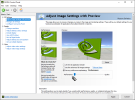
Thanks, it works fine for me.People with dual PC go to your STREAMING PC nvidia settings and select "Use my preference emphasising" and choose "perfomance"
i dont know why this helped with Elgato HD 60+ S
i dont get those annoying stutter anymore
Made 1min test with wow
![]()
I made an account just to write to you, I have a near stream ccd10 4k60 and could not for the damn life of me figure out what was causing these frame drop issues, I tried literally everything in terms of settings and hardware and console and nothing happened… ON A WHIM I did this step and it actually fixed lol…. Here confirming that it works on other cards besides elgato and to thank you again!People with dual PC go to your STREAMING PC nvidia settings and select "Use my preference emphasising" and choose "perfomance"
i dont know why this helped with Elgato HD 60+ S
i dont get those annoying stutter anymore
Made 1min test with wow
![]()