HammerGeek
New Member
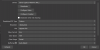
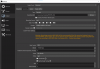
I'm a bit of a novice with OBS when it comes to detailed settings. I've got a 4KPro Elgato card and the highest resolution OBS will allow me to select is 1920x1080. I watched some YouTube videos and each of them said, "Just select a 4K recording quality like 3840x2160." However, 3840x2160 is not available to me as an option in the Video, Base Canvas drop down. All I have is 1920x1080 and 1280x720. Can anyone help me figure out what I'm missing?
My PC:
AMD Ryzen 7 2700X Eight-Core Processor 3.70GHz
16 GB RAM
64-bit Windows 10
OBS Logs:
https://obsproject.com/logs/NcjOZIp4aGyUrvu5
I'm thankful for any help.
My PC:
AMD Ryzen 7 2700X Eight-Core Processor 3.70GHz
16 GB RAM
64-bit Windows 10
OBS Logs:
https://obsproject.com/logs/NcjOZIp4aGyUrvu5
I'm thankful for any help.