Trying to update to 32.0.4 from 32.0.2 - Integrity failed!

StarfellFae

New Member
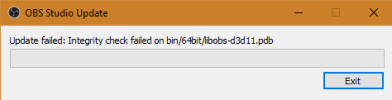
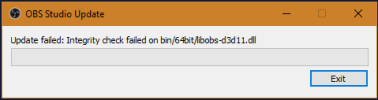
This is my first time posting, but I ran into an issue while attempting to update to 32.0.4 on OBS. It indicates an integrity failure of the libobs-d3d11 files (both DLL and PDB)...

I cannot verify the installation as I'm not at the newest install. I have deleted the OBS files and re-downloaded the "newest" client, which just threw me back to 32.0.2 with the SAME ERRORS. I'm stumped on how to handle this one, because reinstalling doesn't even work to fix it...
 

Attachments

  • image_2025-12-13_213144516.png
    image_2025-12-13_213144516.png
    4.3 KB · Views: 8
  • image_2025-12-13_213219888.png
    image_2025-12-13_213219888.png
    4 KB · Views: 8

StarfellFae

New Member
Minor update: Got another set of those two files from someone in my household, who could update as far as I'm aware... Replaced the files, other bin files were pinging as broken as well... I have ripped all of the OBS software from my device (including registry things) using Revo, NO LUCK with re-install using that either..
 

StarfellFae

New Member
Was able to force it to 32.0.4 using obs-studio folder from said family member, still cannot verify integrity or anything, but it's progress... WTF is going on to cause this?!
 
Minor update: Got another set of those two files from someone in my household, who could update as far as I'm aware... Replaced the files, other bin files were pinging as broken as well... I have ripped all of the OBS software from my device (including registry things) using Revo, NO LUCK with re-install using that either..

Yeah, I'm afraid to uninstall (currently on 32.0.2 version) for fear that I will not even be able to reinstall OBS.

I'm getting the same errors you're getting. However, in addition to that, running the installer downloaded from OBS official site doesn't work for me. The installer fails almost immediately because "OBS files are being used by ASUS NodeJS Web Framework."

If I end that process in task manager and try to run the OBS installer really quick, I get yet another error. Says it is unable to open file for writing, C:\ProgramData\obs-studio-hook\graphics-hook32.dll

Guess I'm just not going to update. And certainly not going to uninstall OBS because of these other problems (which are probably unrelated, not trying to derail the thread).
 

qhobbes

Active Member
@SolKaiju You can always try installing from the zip from https://obsproject.com/download . You also do a portable install by coping those files to another directory and run in portable mode to try out different versions. You can export/import profiles and scene collections between the 2.

@witchcraft_streams you can download and reinstall older versions of OBS by going to the above download link and clicking on the [Previous Releases] button in the bottom-right.
 
Top