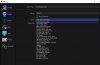
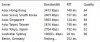
Hey guys I have never had an issue streaming until now as I am getting auto connected to asian servers. I reead a post earlier today that sydney servers are down, but they have now since come back up. I have my aussie mates streaming right now to them :(
When I look at my server selection box there is no Sydney server selection for some reason, I have tried restarting everything under the sun to try and fix this issue. Here are some screenshots to show my porblem and to show that the sydney servers are up and running.
https://gist.github.com/a76d8fcc7fcad55f1d897f6f4dac2865
When I look at my server selection box there is no Sydney server selection for some reason, I have tried restarting everything under the sun to try and fix this issue. Here are some screenshots to show my porblem and to show that the sydney servers are up and running.
https://gist.github.com/a76d8fcc7fcad55f1d897f6f4dac2865