Hi since a couple of days both my preview and recording are heavily stuttering.
The strange thing is that I have been recording with OBS in 1080p/60 for months without any issues. Everything has been smooth and fine, until two days ago. I did not change things to create this impact.
For an example (with fpsVR performance dashboard overlay) see the video: https://youtu.be/1wl178bAgC4
The recent Log: https://obsproject.com/logs/SXWs9m3k-QVe4qyd points to a Rendering Lag and a GPU Encoder Overload.
I have a beefy computer and use it mainly for playing DCS in VR. GPU load from the game is about 70% and both fpsVR and Windows Taskmanager say I have plenty of resources left.
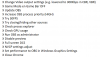
So far I have tried the following things, with no effect:
X Change OBS Video output settings (e.g. lowered to 300Kbps in CBR, VBR)
X Change OBS to simple output mode/ indist. quality
X Game Mode en Game Bar OFF
X Update OBS
X Increase OBS process priority (HIGH)
X Try 30FPS
X Try closing/hiding other sources
X Check proces explorer
X Check GPU usage
X Run OBS as administrator
X Disable preview
X Full screen DCS
X NVCP settings adjust
X Set performance to OBS in Windows Graphics Settings
X Close Chrome
Any help is appreciated!
The strange thing is that I have been recording with OBS in 1080p/60 for months without any issues. Everything has been smooth and fine, until two days ago. I did not change things to create this impact.
For an example (with fpsVR performance dashboard overlay) see the video: https://youtu.be/1wl178bAgC4
The recent Log: https://obsproject.com/logs/SXWs9m3k-QVe4qyd points to a Rendering Lag and a GPU Encoder Overload.
I have a beefy computer and use it mainly for playing DCS in VR. GPU load from the game is about 70% and both fpsVR and Windows Taskmanager say I have plenty of resources left.
So far I have tried the following things, with no effect:
X Change OBS Video output settings (e.g. lowered to 300Kbps in CBR, VBR)
X Change OBS to simple output mode/ indist. quality
X Game Mode en Game Bar OFF
X Update OBS
X Increase OBS process priority (HIGH)
X Try 30FPS
X Try closing/hiding other sources
X Check proces explorer
X Check GPU usage
X Run OBS as administrator
X Disable preview
X Full screen DCS
X NVCP settings adjust
X Set performance to OBS in Windows Graphics Settings
X Close Chrome
Any help is appreciated!