Stream lags on twitch then turning on game.... HELP

phron

New Member
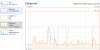
Hello guys, already watched a lot of videos in youtube, readed some post but nothing helps me... Problem what im turning on stream and looks like everything works fine, but if im turning on game "League of legends, CSgo, valorant" stream strats lagg, wrinting in corner "unstable" and even shuts down. This is my pc propertys AMD Ryzen 7 4800H 16gbrm, 2060 rtx. Internet speed 100mb/s upload and download. I dont see where can be problem, because i tried to run stream on low settings and on high, change video settings in games, but everything is same. So im attaching some photos while stream is runing and im in game with high graphics. Btw in game im getting like 200-400fps with stream on. If im turning off game, stream starts working good. Maybe you can tell me some solutions?
 

Attachments

  • Screenshot 2022-02-09 163614.png
    Screenshot 2022-02-09 163614.png
    18.7 KB · Views: 31
  • Screenshot 2022-02-09 163632.png
    Screenshot 2022-02-09 163632.png
    9.8 KB · Views: 25
  • Screenshot 2022-02-09 163746.png
    Screenshot 2022-02-09 163746.png
    42.9 KB · Views: 38
Okey so check every possible update, so windows and bios is up to date, drivers too. PC is like 3 month old... Here is logs then stream without game on https://obsproject.com/logs/yAXLcCHwxNzBYXOh, and here is stream logs then im in game https://obsproject.com/logs/0n2SMlqIi4cvPvc7. Maybe its because laptop? Lenova legion? Or maybe its because of internet? Because then stream is on and im in game i cant even open website for internet speed test check...? But if im checking game ping so its around 20ms, in valorant showing like 6-10ping, but having spikes...
 
OKEY GUYS, just found problem and i solved that... So if you will game same issue, make sure your your Network Priority option DISABLE.
 
Back
Top