

You are using an out of date browser. It may not display this or other websites correctly.
You should upgrade or use an alternative browser.
You should upgrade or use an alternative browser.
Question / Help Starting to get frame skipping when streaming.
- Thread starter iori9999
- Start date

iori9999
Member
Here are the recent logs
https://gist.github.com/f5fa8c55df321a2688d8
https://gist.github.com/0e728a78a2adfb01ed4d
https://gist.github.com/bba63ea7635d8e1f03cc
https://gist.github.com/51c6ad3779b89c394865
https://gist.github.com/faea9013a3364df1ee5c
https://gist.github.com/88973b820c6e3a7d6bd5
https://gist.github.com/7ea91e6cc1797b09e9fe
There aren't in order.. But two days ago I was streaming 100% perfectly.. Now I did upgrade my net yesterday, but I was planning on doing that for awhile before this issue occurred..
https://gist.github.com/f5fa8c55df321a2688d8
https://gist.github.com/0e728a78a2adfb01ed4d
https://gist.github.com/bba63ea7635d8e1f03cc
https://gist.github.com/51c6ad3779b89c394865
https://gist.github.com/faea9013a3364df1ee5c
https://gist.github.com/88973b820c6e3a7d6bd5
https://gist.github.com/7ea91e6cc1797b09e9fe
There aren't in order.. But two days ago I was streaming 100% perfectly.. Now I did upgrade my net yesterday, but I was planning on doing that for awhile before this issue occurred..
iori9999
Member
I'm staring to notice that my upload speed is extremely slow for some reason.. Regular ookla speedtest.net recognizes it as 21 MB/s which is great but when I do a closer diagnostic on other sites it's as slow as 2.2 MB/s.. My connection was 90 MB/s download and 12 MB/s upload and I recently upgraded to 125/20.. I'm just curious why I may be getting super low upload speeds.. I can't even stream my desktop(window capture) without it skipping frames as you see from a few tests.. We have had some outages in our area due to weather issues, so I'm wondering if the ISP is the culprit here without them directly knowing about it or is it throttling?
Keep in mind that I am bypassing the router as well and am getting the same results..
Keep in mind that I am bypassing the router as well and am getting the same results..
iori9999
Member
I initially thought this was a router issue because I was getting some slow speeds wirelessly on speed tests.. Slower than normal and less than 50% that to wired.(I have a really good router where the wireless and wired speeds were almost identical before)
But I actually tried to stream my desktop from OBS like mentioned earlier and I feel like bitrates of 3500/7000 shouldn't be too demanding for the internet I have.. I had a previous 60 to 90 MB Down and 10-12 MB upload and could stream those settings 100%.. We had two outages in the last week due to weather issues and these problems have occurred the last two days since..
I called my ISP and so far they said everything is A+ on their end, but to update me if I still have issues since the outages could have very well damaged some lines..
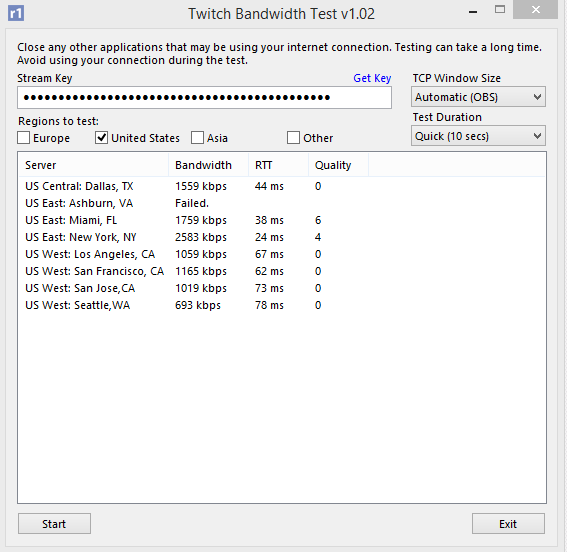
And just so you are curious

Keep in mind I live in Detroit and get a slightly better reading if I were to test the server in Detroit Comcast..
But I actually tried to stream my desktop from OBS like mentioned earlier and I feel like bitrates of 3500/7000 shouldn't be too demanding for the internet I have.. I had a previous 60 to 90 MB Down and 10-12 MB upload and could stream those settings 100%.. We had two outages in the last week due to weather issues and these problems have occurred the last two days since..
I called my ISP and so far they said everything is A+ on their end, but to update me if I still have issues since the outages could have very well damaged some lines..
And just so you are curious
Keep in mind I live in Detroit and get a slightly better reading if I were to test the server in Detroit Comcast..


NicOnAcid
Member
If you want to Stream anyway, and Twitch make Problems with ISP Routing, download the OBS Ping Plugin and check the Results of Hitbox Service. Or another Service you like. It this Service has a better Routing for you, i think u have only 2 Options
1: Switch to Hitbox, or another Service wich has a good Routing for you
2: Like Osiris says, talk to your ISP if there are known Problems to Twitchserver.
1: Switch to Hitbox, or another Service wich has a good Routing for you
2: Like Osiris says, talk to your ISP if there are known Problems to Twitchserver.
iori9999
Member
No it doesn't work with hitbox either.. This is so damn frustrating.. My ISP keeps stating that my signals and numbers are looking good but there is obviously something wrong.. It feels like my upload speed is garbage but when I test my speeds on the desktop for ookla they look fine.. When I test on a deeper diagnostic test where it checks packet loss, my upload is significantly lower in the readings.. If my goddamn upload was really 20 MB/s, I would have no issue streaming with the settings provided..
Again I notice that my wireless readings are way worse than before.. They were much closer to my wired readings.. I have never experienced something like this.. Anyone have an idea?
Again I notice that my wireless readings are way worse than before.. They were much closer to my wired readings.. I have never experienced something like this.. Anyone have an idea?
iori9999
Member
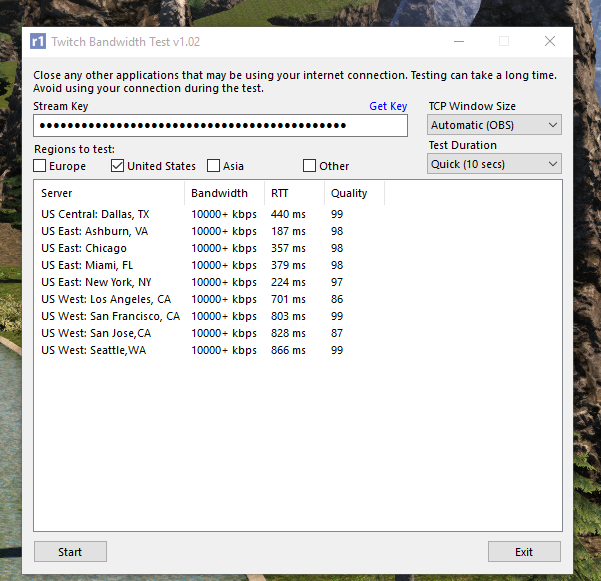
Wanted to open this back up.. I finally got the upload issues with my ISP solved but ever since I upgraded to windows 10, I am having huge issues with latency to the twitch servers. I tested OBS and what happens is I never skip frames, but it wont stay at 60 fps either.. It fluctuates down to even 40 when I move my character in FFXIV. Anyways here are my recent twitch bandwitch tests..
iori9999
Member
here are my recent log files
https://gist.github.com/259d882bee887cd95ec5
https://gist.github.com/924bf9b38443ce89d4c7
https://gist.github.com/259d882bee887cd95ec5
https://gist.github.com/924bf9b38443ce89d4c7