


Kraezy
Member
Hi all, hopefully there's someone who can direct me as I'm all out of ideas.
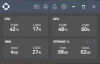
Issue: Games run butter smooth but rendered Video has some form of sporadic slow down in the video, even though there's plenty of headroom for OBS. Either syncing or dropped frames (even though Stats confirm zero dropped frames) or some form of process being handled, ran.
Rig / Recording status:
[ CPU Temp: 42c || Load: 15% ----GPU Temp: 45c || Load: 54% ]
0 dropped frames | 0 dropped rendered frames
Source:
1st Video:

 www.youtube.com
2nd Video:
www.youtube.com
2nd Video:
 www.youtube.com
Log:
My Setup:
I7-4770k @ 4.0
MSI Z97-Gaming 5 Mobo
MSI GTX980TI 6G
16gb Corsair Vengeance 1600mhz
2 BENQ 144hz Monitor (1 DVI 1 DPI)
Running the below in different variables:
- Running on 1 Monitor @ 144hz and @120hz and 60hz
(to remove possible 2 monitor syncing issue - I know it's normally known between different refresh rates but figured I'd start here)
- Frame rate capping to 120 and to 60
- Trying Steamlabs OBS
- Reverting to an older version of OBS Studio (pre 23.0 for the old nvenc encoder)
- Disabling OBS Preview
- Changing recording format (tried MP4, FLV, MKV)
- Changing Rate Control (VBR / CQP / CBR)
- Dropping bitrate
- Dropping Preset to Quality > Performance
- Unticking Looking Ahead + PVT
- Running Process Priority on High
Followed Optimisation guide as per below link to ensure no unnecessary services / processes are running and any other bloat software.

 www.boredgamer.co.uk
Hopefully there's enough info there for someone to direct me somewhat as I've exhausted all ideas my end. If you require anything else let me know.
Thanks in advance for any help !
Issue: Games run butter smooth but rendered Video has some form of sporadic slow down in the video, even though there's plenty of headroom for OBS. Either syncing or dropped frames (even though Stats confirm zero dropped frames) or some form of process being handled, ran.
Rig / Recording status:
[ CPU Temp: 42c || Load: 15% ----GPU Temp: 45c || Load: 54% ]
0 dropped frames | 0 dropped rendered frames
Source:
1st Video:
OBS-test-slowdown-bug
Donations / Tips ───────────── All donations/tips will be seen on stream. Whilst these are very much appreciated and will go towards providing better conte...
www.youtube.com
2nd test- windowcapture OBS - slowdown bug
Donations / Tips ───────────── All donations/tips will be seen on stream. Whilst these are very much appreciated and will go towards providing better conte...
www.youtube.com
Log:
My Setup:
I7-4770k @ 4.0
MSI Z97-Gaming 5 Mobo
MSI GTX980TI 6G
16gb Corsair Vengeance 1600mhz
2 BENQ 144hz Monitor (1 DVI 1 DPI)
Running the below in different variables:
- Running on 1 Monitor @ 144hz and @120hz and 60hz
(to remove possible 2 monitor syncing issue - I know it's normally known between different refresh rates but figured I'd start here)
- Frame rate capping to 120 and to 60
- Trying Steamlabs OBS
- Reverting to an older version of OBS Studio (pre 23.0 for the old nvenc encoder)
- Disabling OBS Preview
- Changing recording format (tried MP4, FLV, MKV)
- Changing Rate Control (VBR / CQP / CBR)
- Dropping bitrate
- Dropping Preset to Quality > Performance
- Unticking Looking Ahead + PVT
- Running Process Priority on High
Followed Optimisation guide as per below link to ensure no unnecessary services / processes are running and any other bloat software.
BoredGamer
Star Citizen & Squadron 42 content is the Focus of BoredGamer including News, Tutorials, Guides, Tips, Gameplay, Concept Ships, Buyer's Guides, FAQs, Podcasts, Exclusive Interviews, Lore, CitizenCon as well as each individual Patch & Update. It's a one stop Channel for Star Citizen. Squadron...
www.boredgamer.co.uk
Hopefully there's enough info there for someone to direct me somewhat as I've exhausted all ideas my end. If you require anything else let me know.
Thanks in advance for any help !
Attachments
Last edited: