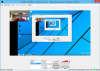
I started to create a scene to capture my desktop and some really strange stuff was happening. The preview screen was not showing the whole screen. I have all my aspect rations set to 720. Also everything on the control panel shrank for some reason.
As you can see in the attached photo it only show the upper quarter in the preview, even when I tried to resize. The rest of the computer is fine however. Also, you can see the volume icons are chopped off as are the text in the buttons. Any help?
As you can see in the attached photo it only show the upper quarter in the preview, even when I tried to resize. The rest of the computer is fine however. Also, you can see the volume icons are chopped off as are the text in the buttons. Any help?