Resource icon

Reorderable Audio Mixer 1.1.2

Yo, I already love this, would be great if you could add vertical support to the mixer as well. I make music and all of my audio software defaults that way, and the horizontal look has just never made sense to me haha

Otherwise so far, it does exactly what it says it does, and I'm honestly shocked this isn't already in OBS haha

Thanks for your work on it!
 
thetomcanuck updated Reorderable Audio Mixer with a new update entry:

Better Handling of hide/unhide active/inactive

- Hiding a source within the mixer (three dots -> hide) removes it's position intentionally. Unhiding all sources moves all previously hidden sources to the bottom. removing pollution of familiar layout

- hiding a source via inactive in the sources menu does preserve it's position. this gets a bit messy when reordering source from below to over top or over top to below of inactive sources obviously. it works, it's just hard to take inactive scenes into account mentally when moving things.

Read the rest of this update entry...
 
Yo, I already love this, would be great if you could add vertical support to the mixer as well. I make music and all of my audio software defaults that way, and the horizontal look has just never made sense to me haha

Otherwise so far, it does exactly what it says it does, and I'm honestly shocked this isn't already in OBS haha

Thanks for your work on it!
I'll start poking at this, see what i can do. thanks for the feedback!
 
This is great! I'm using it to get back prior behavior of OBS mixer: muted-equals-meter will be greyed-out (regardless if the source is monitored or not.) Thank you for sharing your work! I bet you've already thought this, but in case maybe you agree, it would be really nice to have the Mute button be more obnoxious and maybe the controls at the bottom, but it's whatever! The re-orderability is superb! I've been using numbers to get them ordered how I want, but it can be cumbersome. This would be superb functionality for base OBS.
 
This is great! I'm using it to get back prior behavior of OBS mixer: muted-equals-meter will be greyed-out (regardless if the source is monitored or not.) Thank you for sharing your work! I bet you've already thought this, but in case maybe you agree, it would be really nice to have the Mute button be more obnoxious and maybe the controls at the bottom, but it's whatever! The re-orderability is superb! I've been using numbers to get them ordered how I want, but it can be cumbersome. This would be superb functionality for base OBS.
You're right, I have been trying to think of how to make the mute button a little bigger. I'm torn though because I want that slider to be as long as possible for fine tuned adjustments.

as for the controls at the bottom and what not. yeah. I wanna move the right click menu stuff (unhide all, vertical/horizontal switch) to the bottom at least to try it out. They're in right click right now because i dont think they'd get used all that much, and right click keeps them from being misclicked easily. Just haven't had the time to take this for a spin.

first though i need to tidy up that vertical layout a bit more. Functional? sure. Ugly? kinda.

Thanks for the input! glad you're enjoying it
 
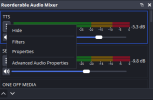
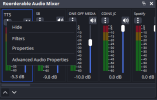
Seriously, thank YOU! You're on the right trail! One question: are the 3-dot buttons supposed to have menu options associated? They seem to just select the fader, like touching the fader strip does anywhere else. I have a feeling there is supposed to be an associated menu that's not popping up with quick access to source properties and filters.
When I click the 3 dots I get nothing but the animation to show the channel is selected.

Cheers and thanks!

You're right, I have been trying to think of how to make the mute button a little bigger. I'm torn though because I want that slider to be as long as possible for fine tuned adjustments.

as for the controls at the bottom and what not. yeah. I wanna move the right click menu stuff (unhide all, vertical/horizontal switch) to the bottom at least to try it out. They're in right click right now because i dont think they'd get used all that much, and right click keeps them from being misclicked easily. Just haven't had the time to take this for a spin.

first though i need to tidy up that vertical layout a bit more. Functional? sure. Ugly? kinda.

Thanks for the input! glad you're enjoying it
 
Seriously, thank YOU! You're on the right trail! One question: are the 3-dot buttons supposed to have menu options associated? They seem to just select the fader, like touching the fader strip does anywhere else. I have a feeling there is supposed to be an associated menu that's not popping up with quick access to source properties and filters.
When I click the 3 dots I get nothing but the animation to show the channel is selected.

Cheers and thanks!
yeah, it should... give you some options. What version of OBS are you on? Windows or Linux? and you're on the current version of the plugin?
 

Attachments

  • 2026-02-03 18.30.57.png
    2026-02-03 18.30.57.png
    8.6 KB · Views: 35
  • 2026-02-03 18.31.35.png
    2026-02-03 18.31.35.png
    12.2 KB · Views: 21
this is huge but theres a few problems I have with it hope this helps you with development
You should make it more compact or as identical to the original one as possible, I think people that use this would prefer that, you probably just need to lower the label sizes, less padding inside the kebab menu button and less padding around the entire tracks
1770173049875.png

as you can see there, sources such as browser sources and window captures with capture audio deselected are displaying in the menu, although you can hide them you should have them hidden automatically
you should see if there is a way it can use the same colors the user sets in obs through settings -> accessibility, it would help
you should add the little settings button that is there on the bottom of the original audio mixer next to the two arrows you set
definetely move the decibels above the meters on the right instead of straight to the right of the meters on the horizontal layout, because when you for example go from 0db to a negative value, the meter changes in size because it needs to make room for the label and it just doesnt look as good imo
when selecting an audio track (basically talking about the blue outline you set when selecting one), you should fix the outline causing everything to get moved, by adding space for the outline for each track even if theyre not selected so its seamless and doesnt reposition everything.
for some reason some names grow in size compared to others randomly, I dont think this was intended and the size resets back to the size i assume you set when selecting that track.

now for features since you have tools to do these I think this would make your plugin get widespread adoption at least throughout this community and I would love it
you should add a dropdown menu next to the arrows (edit: or add it to the right click dropdown menu) so you can display custom features like displaying the audio tracks to the right of each track in the mixer, these:
1770173386495.png

I dislike having to open the settings menu every time for this and it would be very helpful
you should add a compact mode checkbox in the dropdown to switch between the layout you have now and a more compact view with little to no padding
this may be amibitious but adding a feature where when double clicking the name of an audio track, it becomes an editable label that you can type in the new name, which then changes the name of the source in the sources list as well.

finally, for growth reasons you should create a installer for the plugin to provide both the option to drag the files in or use the installer, I use inno setup for installers but ultimately up to you

so thats all I could think of but man you got a good idea on your hands and would love to see this grow brotha

 
Last edited:
this is huge but theres a few problems I have with it hope this helps you with development
You should make it more compact or as identical to the original one as possible, I think people that use this would prefer that, you probably just need to lower the label sizes, less padding inside the kebab menu button and less padding around the entire tracks
View attachment 118183
as you can see there, sources such as browser sources and window captures with capture audio deselected are displaying in the menu, although you can hide them you should have them hidden automatically
you should see if there is a way it can use the same colors the user sets in obs through settings -> accessibility, it would help
you should add the little settings button that is there on the bottom of the original audio mixer next to the two arrows you set
definetely move the decibels above the meters on the right instead of straight to the right of the meters on the horizontal layout, because when you for example go from 0db to a negative value, the meter changes in size because it needs to make room for the label and it just doesnt look as good imo
when selecting an audio track (basically talking about the blue outline you set when selecting one), you should fix the outline causing everything to get moved, by adding space for the outline for each track even if theyre not selected so its seamless and doesnt reposition everything.
for some reason some names grow in size compared to others randomly, I dont think this was intended and the size resets back to the size i assume you set when selecting that track.

now for features since you have tools to do these I think this would make your plugin get widespread adoption at least throughout this community and I would love it
you should add a dropdown menu next to the arrows (edit: or add it to the right click dropdown menu) so you can display custom features like displaying the audio tracks to the right of each track in the mixer, these:
View attachment 118184
I dislike having to open the settings menu every time for this and it would be very helpful
you should add a compact mode checkbox in the dropdown to switch between the layout you have now and a more compact view with little to no padding
this may be amibitious but adding a feature where when double clicking the name of an audio track, it becomes an editable label that you can type in the new name, which then changes the name of the source in the sources list as well.

finally, for growth reasons you should create a installer for the plugin to provide both the option to drag the files in or use the installer, I use inno setup for installers but ultimately up to you

so thats all I could think of but man you got a good idea on your hands and would love to see this grow brotha
ayo thank you so much for the feedback. some of that was on my radar like accessibility, and some was brand new like the audio tracks being easier to access. lots of good stuff in your post!

I'm a bit tied up with other stuff for the next few days, but i'm expecting to get something out near the end of next week with more improvements. wont be even close to everything, but little by little we'll get there. thanks again!
 
Not abandoned. just turns out adding accessibility / theme support was way way more than i thought lol. it's redoing a ton of things differently. its a great suggestion, and should be done. its just a lot of tearing down and re-doing differently. personally i have never touched the appearance settings before ... so themes never entered my mind initially.

we'll get there. working on it
 
yeah, it should... give you some options. What version of OBS are you on? Windows or Linux? and you're on the current version of the plugin?
Thanks again - I'm on win 11 current, OBS current, only plugin version number i could find was in the file details 1.1.1.0

The three dots don't seem to work in either layout, or after killing the dock and starting a new one.
Cheers
 
Thanks again - I'm on win 11 current, OBS current, only plugin version number i could find was in the file details 1.1.1.0

The three dots don't seem to work in either layout, or after killing the dock and starting a new one.
Cheers
interesting. I'll pause the big work and poke at this over the weekend. see if i can break mine lol, or what could be happening
 
interesting. I'll pause the big work and poke at this over the weekend. see if i can break mine lol, or what could be happening
Hey! just installed your plugin for the sake of testing and faced the same issue of non-working three-dots button.
But got figured out the reproduce steps:
1) run OBS with plugin just installed - you have horizontal layout and everything is OK
2) switching to vertical layout as it more preferable for large amount of audio sources
3) everything is still OK
4) restart OBS
5) things go badly
6) switch back to horizontal layout - three-dots button still inactive
7) restart again - works well

so, if you relauch OBS with vertical layout of reorderable-audio-mixer, then it button will stop to work
in same time, horizontal layout is good in any case (even after series of restarts - button is active)
 
Yes it fixes it for 1 re-load, but then returns to not working after a restart. I notice that the font size above the channel when it is working is nice and compact, until a channel is selected, that channel gets a larger font, returns to the smaller when selecting a dif channel. but after re-reloading the font size is larger for all the channels from start and does not change based on being selected or not. and the 3 dots no longer work.
 
Back
Top