Hi,
I'd appreciate your advice, since the information I found on OBS forum recommending settings for recording referred to gaming context.
My use case is less demanding than gaming: recording screencast explaining the usage of software applications.
Some notes:
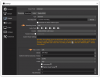
=> Given that, what is CBR value do you recommend?
I'm considering to record using a Constant Bitrate since I intend to edit the OBS output later on Vegas video editing software (www.vegascreativesoftware.com). From some threads, I got that CBR is the most friendly rate format to edit on Vegas.
If you think there are other relevant settings, I'd appreciate a lot to hear them from you
Thank you very much!
_Carlos_

I'd appreciate your advice, since the information I found on OBS forum recommending settings for recording referred to gaming context.
My use case is less demanding than gaming: recording screencast explaining the usage of software applications.
Some notes:
- Most of the screen remains still.
- Most of the movements come from the mouse and software interfaces, dialogs, and drop-down menus popping-up and being tweaked.
- Examples of applications I'm recording are from Microsoft Office, with PowerPoint being the one that would request the highest performance because of its transitions and animations. Eventually, the extreme scenario would be the demonstration of an embed video being played from within PowerPoint.
=> Given that, what is CBR value do you recommend?
I'm considering to record using a Constant Bitrate since I intend to edit the OBS output later on Vegas video editing software (www.vegascreativesoftware.com). From some threads, I got that CBR is the most friendly rate format to edit on Vegas.
If you think there are other relevant settings, I'd appreciate a lot to hear them from you
Thank you very much!
_Carlos_