

Hey
I did everything to use Quick Sync but the fild is stil greayed out.
Yes, I did (https://mirillis.com/en/products/tutorials/action-tutorial-intel-quick-sync-setup_for_desktops.html) this.
Nope, it does not work.
Stats:
Windows 8.1 N
Intel Core i5 2500 (yes it supprots quick sync (http://ark.intel.com/de/products/52209/Intel-Core-i5-2500-Processor-6M-Cache-up-to-3_70-GHz))
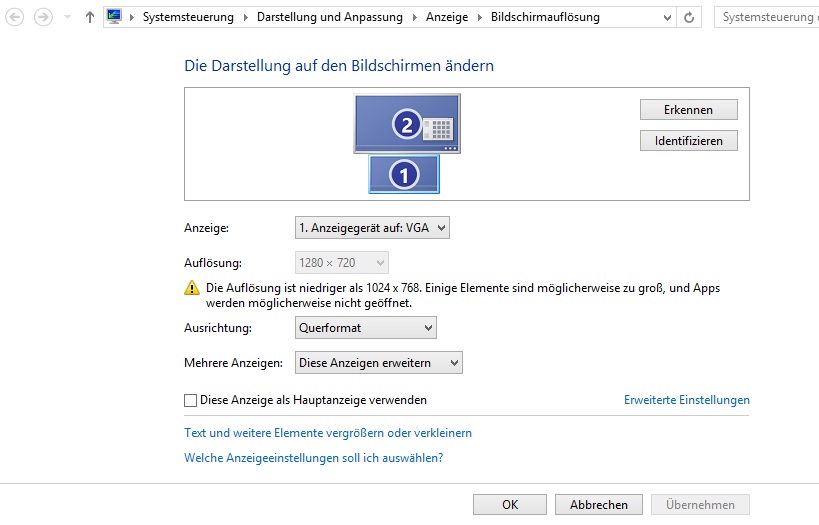
I did the same as in the tutorial, ativated the igpu and multiplied it as virtual desktop:
What did I try?
I tried connection a real monitor at the onboard vga.
I installed and reinstalled all possible Intel drivers (downloaded the intel driver update tool that searches for everyhing)
I read alomst all thread about this and tried the "solved" but none want to work.
So here is my question:
Any idears what to do?
I would send a obs log, but this wont help very much or, because why should obs write into the log file, why quick sync is not working.
Thanks for reading, if you got some idears, just post them here.
Sinmson
I did everything to use Quick Sync but the fild is stil greayed out.
Yes, I did (https://mirillis.com/en/products/tutorials/action-tutorial-intel-quick-sync-setup_for_desktops.html) this.
Nope, it does not work.
Stats:
Windows 8.1 N
Intel Core i5 2500 (yes it supprots quick sync (http://ark.intel.com/de/products/52209/Intel-Core-i5-2500-Processor-6M-Cache-up-to-3_70-GHz))
I did the same as in the tutorial, ativated the igpu and multiplied it as virtual desktop:
What did I try?
I tried connection a real monitor at the onboard vga.
I installed and reinstalled all possible Intel drivers (downloaded the intel driver update tool that searches for everyhing)
I read alomst all thread about this and tried the "solved" but none want to work.
So here is my question:
Any idears what to do?
I would send a obs log, but this wont help very much or, because why should obs write into the log file, why quick sync is not working.
Thanks for reading, if you got some idears, just post them here.
Sinmson