Question / Help Please check my logfile and tell me can I change something to improve stream?

Kepasa

Member
Hey!

I would like you to check my logfile and tell me is there everything ok or I just need to change something, please.
My internet connection: 60/3.
 

Attachments

Looks fine. Only tweaks I'd make would be to match your bitrate and buffer, switch off CFR (unless you're recording locally to later edit with Vegas or another editing program that requires it, CFR isn't needed), and if possible remove syncing audio to video time, unless you're getting game audio to video drift over time (using this sync method can cause issues).

Also, if your main monitor is 1920x1080 (and you're playing at 1080p), it'd be a good idea to set your workspace to that, and use one of the dropdown-box downscales to reduce it to 720p instead. The in-preview resize is less efficient and lower quality than the overall downscale.

 
Yes my main monitor is 1920x1080 and sometimes I play on 1920x1080.
In obs I have downscaled to 720p (fastest). Why, I should off CFR? I heard that Twitch require this options to be enable.
 
Yes, but your OBS workspace is set to 1280x720, instead of 1920x1080 and then downscaled via the dropdown box.

Twitch requires CBR (constant bitrate), not CFR (constant framerate). CFR is only needed if you will be recording locally, and editing those videos in Sony Vegas.
 
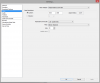
Look at the file. I uploaded my video tab from OBS. I think it's right as it should be. I thought that Twitch require cfr.
 

Attachments

  • workspace video tab.png
    workspace video tab.png
    16.9 KB · Views: 14
Back
Top