


You are using an out of date browser. It may not display this or other websites correctly.
You should upgrade or use an alternative browser.
You should upgrade or use an alternative browser.
Question / Help Pixelated
- Thread starter harralexander
- Start date
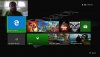

harralexander
New Member
Yes it is.

BigYuckFou
Member
give us a log file of a test stream please. I want to look at it.
harralexander
New Member
Sorry I'm new on this. What is a log file and how do I test stream without streaming?

carlmmii
Active Member
Please post a log with your issue! Here's how...
OBS Studio creates a log file each time you run it which contains very useful diagnostic information. Without a log file, it's much harder for any support volunteers to figure out problems and your post may be ignored. To upload a log file, go to the Help menu > Log Files > Upload Last Log...
obsproject.com
In the output tab of settings, change your recorder setting to Use Stream Encoder. Then start recording, do your test, and stop recording after at least 30sec.
harralexander
New Member
https://obsproject.com/logs/3xBWWdw5tVwA4Hv0
I believe this is what you were talking about with a log file.
I believe this is what you were talking about with a log file.
carlmmii
Active Member
Code:
9:19:21 AM.706: [DShow Device: 'El Gato HD60'] settings updated:
9:19:21 AM.706:     video device: Elgato Game Capture HD
9:19:21 AM.706:     video path: __elgato
9:19:21 AM.706:     resolution: 640x480
9:19:21 AM.706:     flip: 0
9:19:21 AM.706:     fps: 30.00 (interval: 333333)
9:19:21 AM.706:     format: UYVY
9:19:21 AM.728:     using video device audio: yes
9:19:21 AM.728:     sample rate: 0
9:19:21 AM.728:     channels: 0
9:19:21 AM.728:     audio type: WaveOut
Change your Elgato's resolution to 1920x1080, or leave it back on the "Default" setting for resolution.
harralexander
New Member
Thanks so much. Looks like it worked. I didn't even realize the El Gato resolution was off.