Performance Issues

iFlysimX

New Member
Hello all!

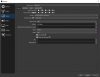
I am having some performance issues while using OBS and streaming which is causing my game to stutter a bit and not be as smooth with OBS off. Also, seems like OBS uses about 25 to 30% of my GPU which I find kind of high. Any tips would really be appreciated.

i9-9900K O/C 5.0 GHz | ASUS ROG Strix NVIDIA GeForce RTX 3080 OC Edition | 32GB DDR 4 - 3200MHz | Asus Rog Strix Z390-E Gaming | Sabrent 512GB M.2 & Sabrent 1TB M.2

Rate Control = CBR
Bitrate = 4000
Keyframe intervals =0
Preset = Max Quality
Profile= High
GPU= 0
Look ahead = unchecked
Psycho visual tuning = checked
Max B frames = 2

Thank you!
 
Last edited:
Use the Quality preset, not Max Quality. Disable Psychovisual Tuning. Both of these use CUDA cores and can cause performance issues where none should occur. (Lookahead also, but you already have that off.)

Beyond that we'd need to see a logfile from a recording or streaming session at least 30 seconds in length where the issue was occurring to be able to troubleshoot properly.
 
Use the Quality preset, not Max Quality. Disable Psychovisual Tuning. Both of these use CUDA cores and can cause performance issues where none should occur. (Lookahead also, but you already have that off.)

Beyond that we'd need to see a logfile from a recording or streaming session at least 30 seconds in length where the issue was occurring to be able to troubleshoot properly.

 
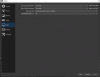
The downscale method you're using is disabling NVENC and falling back to ffmpeg which is not GPU-accelerated, and will have a very heavy CPU load with the settings in-use.
Are you downscaling in Settings->Output at present? Swap over to scaling in Settings->Video instead.

You also appear to be streaming over Wifi, which you should NEVER do. Run a cable. Unrelated to the performance issue, but wifi is NOT a network cable replacement, and is extremely susceptible to interference. It's not meant for applications that rely on constant high-throughput like sending a livestream, it's for lightweight content consumption.
 
The downscale method you're using is disabling NVENC and falling back to ffmpeg which is not GPU-accelerated, and will have a very heavy CPU load with the settings in-use.
Are you downscaling in Settings->Output at present? Swap over to scaling in Settings->Video instead.

You also appear to be streaming over Wifi, which you should NEVER do. Run a cable. Unrelated to the performance issue, but wifi is NOT a network cable replacement, and is extremely susceptible to interference. It's not meant for applications that rely on constant high-throughput like sending a livestream, it's for lightweight content consumption.

Got it but then why does OBS still drive up my GPU usage by 25 to 35%?

Here you go!
 

Attachments

  • 1.PNG
    1.PNG
    34.8 KB · Views: 26
  • 2.PNG
    2.PNG
    23.5 KB · Views: 27
On Settings->Output, UNCHECK 'Rescale Output'. That's a software rescale that forces CPU.
Having the Output set in Settings->Video to 1080p (as you already have) is the right way to do it.
Essentially you're currently downscaling the right(ish) way 1440->1080p, then "downscaling" the software way... 1080p->1080p. Doing nothing. But since it's active, OBS still has to fall back to not using NVENC.

OBS DOES always use some GPU time, usually only a tiny sliver though. Chances are you were looking at the GPU load with OBS idle and no game loaded, and so your GPU was in a downclocked idle-state where that tiny sliver is actually visible. GPU load and GPU encoding load (NVENC) are separate graphs. NVENC uses NO 3D rendering resources whatsoever.
 
On Settings->Output, UNCHECK 'Rescale Output'. That's a software rescale that forces CPU.
Having the Output set in Settings->Video to 1080p (as you already have) is the right way to do it.
Essentially you're currently downscaling the right(ish) way 1440->1080p, then "downscaling" the software way... 1080p->1080p. Doing nothing. But since it's active, OBS still has to fall back to not using NVENC.

OBS DOES always use some GPU time, usually only a tiny sliver though. Chances are you were looking at the GPU load with OBS idle and no game loaded, and so your GPU was in a downclocked idle-state where that tiny sliver is actually visible. GPU load and GPU encoding load (NVENC) are separate graphs. NVENC uses NO 3D rendering resources whatsoever.

Thank you so much! After this tweak, I should be good right? Anything else I should be aware of?

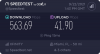
Also, I can't do cable but my Wifi should be good enough...


Attachments

  • 12074538158.png
    12074538158.png
    46.7 KB · Views: 16
Last edited:
Thank you so much! After this tweak, I should be good right? Anything else I should be aware of?

Also, I can't do cable but my Wifi should be good enough...

After this tweak, we can reassess. Troubleshooting is a procedure, not a silver bullet. But yes, that's a potential huge problem fixed. :)

You absolutely can run a cable. 100%. I did it for a living for a long time.
Wifi is EXTREMELY susceptible to interference. It is NOT a replacement for a network cable. It is meant for lightweight content consumption on mobile devices, not constant-throughput-critical applications like outbound livestreaming.

Speedtest sites are worthless to livestreamers. They test peak speed, not minimum constant throughput, and actually throw away the worst results. That's like jumping ten times and touching the highest spot on a wall that you can each time, taking the highest, and saying you're that tall.
 
Back
Top