tantra_lover
New Member
Hello dear community!
First of all I would like to congratulate and thank the developper team for their amazing job!
Please forgive me in advance for my French "accent", for this long post maybe not in the right category and for my basic knowledge of the digital world but I'm eager to learn! :)
Purpose of the setup :
Recording and streaming our tantra sessions with the OBS virtual camera and maybe thru RTMP.
Objective of the post :
Optimizing the setup so that I can offer the best experience to viewers while not overkilling the laptop lifespan.
Laptop setup :
Laptop is laying down on the back of the screen so that it can breathe and let the heat out.
Wireless mouse with "X-mouse button control" software set up so that different click controls allow me to switch remotely to a specific video source.
Video sources setup all at 30fps (cf image enclosed):
Audio source setup :
For now I have a Boya jack mic plugged in the laptop and will receive a better USB one soon.
No need for audio rendering delay so far as I don't have delay with the video sources.
OBS setup :
Canvas and Ouput set to 720p, Lanczos filter at 30fps
Bitrate is set to 3000kbps as there won't a lot of movements or texture changing.
I have on average 110Mbps upload speed over ethernet so I could increase it but I know it will take more CPU power to encode.
Streaming setup :
I will be streaming to at least 3 websites. One only supports local camera with no transcoding option so I will be using the OBS virtual webcam.
For the other 2 they support RTMP and I am wondering whether I should use also the virtual webcam with them or use an NGINX server to multistream.
Recording setup :
That should release a lot of CPU ressource on my laptop for not having x264 encoding.
I am trying to find ways to not stress my laptop as it is not designed for that purpose, confirmed on this post.
This setup is functional so far but I would love to have your feedback before starting to go live for up to 2 hours sometimes.
If you have any tip or sticky post for optimizing this setup either technically with fine-tuning or estheticallly with camera angles I would really appreciate it.
Thank you very much for reading up to here, I hope it might inspire you to give some advice or discover the magic of tantra :)
First of all I would like to congratulate and thank the developper team for their amazing job!
Please forgive me in advance for my French "accent", for this long post maybe not in the right category and for my basic knowledge of the digital world but I'm eager to learn! :)
Purpose of the setup :
Recording and streaming our tantra sessions with the OBS virtual camera and maybe thru RTMP.
Objective of the post :
Optimizing the setup so that I can offer the best experience to viewers while not overkilling the laptop lifespan.
Laptop setup :
- Matebook D14 AMD Ryzen 3600 Vega 8 with Windows 10 x64
Laptop is laying down on the back of the screen so that it can breathe and let the heat out.
Wireless mouse with "X-mouse button control" software set up so that different click controls allow me to switch remotely to a specific video source.
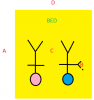
Video sources setup all at 30fps (cf image enclosed):
- A: USB webcam with a 5MP camera at 2k/30fps max
Will be on the side of the bed and at 720p in OBS (Video Capture Device)
- B: Mate 20X with a 40MP camera at 4k/30fps max
Will be in my hand sometimes and will stream at 720p over wifi with the android app IP Webcam (Video Source)
- C: Hero 8 with a 12MP camera at 4k/60fps max
Will be mounted on my ceiling fan and stream at 720p thru the USB webcam utility (Video Capture Device)
- D: Rebel T6 with a 18MP camera at 1080p/30fps max
Will be mounted on a tripod in front of the bed and stream at 1024x700 (cropped and stretched to 720p in OBS) thru the USB Canon EOS Utility (Windows Capture)
I do not use the Canon Webcam utility because I prefer to use the live motion feature allowing me to zoom, focus, move lense... A person will have remote access to my laptop in order to do that or switch scenes (they already do every 30s with the great AdvancedSS plugin)
Audio source setup :
For now I have a Boya jack mic plugged in the laptop and will receive a better USB one soon.
No need for audio rendering delay so far as I don't have delay with the video sources.
OBS setup :
Canvas and Ouput set to 720p, Lanczos filter at 30fps
Bitrate is set to 3000kbps as there won't a lot of movements or texture changing.
I have on average 110Mbps upload speed over ethernet so I could increase it but I know it will take more CPU power to encode.
Streaming setup :
I will be streaming to at least 3 websites. One only supports local camera with no transcoding option so I will be using the OBS virtual webcam.
For the other 2 they support RTMP and I am wondering whether I should use also the virtual webcam with them or use an NGINX server to multistream.
I won't have to open a tab if I use RTMP because another person will manage the virtual rooms for me.I suppose the CPU/memory will increase when using the virtual webcam in different browser tabs?
Recording setup :
I suppose the second option is better especially if I create the server not on the laptop, on another device either my gf's macbook or a Raspberry Pi.I need to record my live sessions, is it better to use OBS for that or the NGINX server?
That should release a lot of CPU ressource on my laptop for not having x264 encoding.
I am trying to find ways to not stress my laptop as it is not designed for that purpose, confirmed on this post.
This setup is functional so far but I would love to have your feedback before starting to go live for up to 2 hours sometimes.
If you have any tip or sticky post for optimizing this setup either technically with fine-tuning or estheticallly with camera angles I would really appreciate it.
Thank you very much for reading up to here, I hope it might inspire you to give some advice or discover the magic of tantra :)