
Question / Help OBS Won't Let Me Start Streaming Even At The Lowest Settings.

soulreaper005

New Member
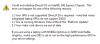
Hi i really want to start streaming again as i got a new hand-me-down pc. the proble mis when i start streaming with OBS it says (look at the picture to see what it says)


which isnt true ive lowered the quality for everything but it still wont launch im not capturing my computer im capturing my capture card.
 

Attachments

  • Capture.PNG
    Capture.PNG
    12.6 KB · Views: 51
Your GPU does not support the hardware DX10 instruction set. You need a new video card.

And yes, this applies even if you're just planning to use a capture card, as OBS uses the GPU for source scaling and scene compositing functions.
 
Then you need to set it to not use the Intel G41 Express integrated GPU, because that doesn't, and from the error message you posted that's the one OBS is set to use.
A quick Google search says that it supports some, but not all hardware DX10 features. Meaning it's missing one or more that OBS needs.

Note that this is NOT the software DX package you can download and install, this is the hardware instruction set.
 
Settings->Video, then at the top select your Video Adapter that isn't the G41.

A capture card is not a video adapter, for these purposes, by the way. On the up side, even most cheap $15 nVidia or AMD budget-grade video cards manufactured in the last 3-5 years should support hardware DX10. So it isn't an expensive fix. Just don't buy a GTX 200-series, they have memory speed issues that affect OBS' performance.
 
I cant dot that because i have an all in one its the Lenovo Thinkcentre A70z its all integrated and the ONLY upgradeable thing i beleive is the processor and the RAM sticks. Im in the middle of building a new gaming rig but it wont be done for a while is there anyway i will be able just to stream using my capture card through OBS?
 
Being entirely frank, with the CPU in that, you'll be having problems with livestreaming to begin with.
http://www.cpubenchmark.net/cpu.php?cpu=Intel+Pentium+E5500+@+2.80GHz

Generally an i5 is the recommended minimum, with an i7 being greatly preferred.
Depending on your capture card, I'd recommend checking the software that came with it; some AverMedia cap devices have built-in hardware encoders. While they deliver extremely poor quality, it's probably going to be better than what that system can swing, frankly. Down side, OBS can't use those encoders as they're proprietary.

Failing that, you may want to try XSplit. And it's REALLY weird to say that, given how much I dislike their software and business practices. But your hardware in that machine isn't going to be able to swing OBS... it's more or less an email+facebook machine. Sorry, man.
 
Well my system isnt that bad i used to run OBS and xsplit fine off of a laptop. and this machine can run mw2 at 20 FPS. and the program that cam with cap card is actually really smooth because i record youtube videos at 1080p 50fps. they look amazing. the only problem is i cant add and overlay facecam or anything so i wanted a program that could thanks for the help and i definately will not use xsplit i also dont like their practices and theyre software isnt that good. Thanks for the help! i also dont get why i would have problem livestreaming to begin with.... all it does is take a video feed and send it to the web. and if my capture card is doing all of the encoding then i really dont get it.
 
Back
Top