Question / Help OBS Studio not recording mic and game audio

GhettoDragon

New Member
I recently downloaded obs studio (the march 21 one) and am having problems recording audio. i know that obs is detecting the audio because the meters are always moving but when i record they are still moving however when i view the recording the audio is not there any help would be much appreciated oh almost forgot i have the desktop audio set for default and same goes for mic but before someone asks yes i have tried setting both of them to a specific audio device and still doesn't work
 

Attachments

If you're seeing the volume levels move in the OBS mixer, the problem is most likely with playback and not recording. Try using a media player like VLC or MPC-HC instead.
 
If you're seeing the volume levels move in the OBS mixer, the problem is most likely with playback and not recording. Try using a media player like VLC or MPC-HC instead.
alright will do but will this affect streaming as well and also how would i use that video file in lets say sony vegas for editing?
 
If it plays back in VLC then it will sound fine in a stream, if you upload the recording to Youtube, etc. You should consult the instructions/manual/support for Vegas if you need to learn how to use that software.
 
Some media players like Media Player Classic can not play all sound tracks at the same time. You can only listen to one track at a time. Your problem was probably that. There is nothing wrong with the recording itself.
 
How do you do this, I don't see anything that allows me to use VLC. Mine records game/desktop audio but not the microphone audio.
 
I went through several hours of research (and attempting all the solutions suggested in this forum and elsewhere), to no avail... but I finally figured out what my problem was. I'm posting here in case it helps anyone else. I'm using Soundflower to route audio from my DAW (Ableton Live) and have it play alongside my microphone input.

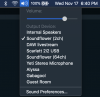
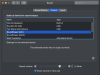
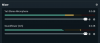
My audio meters were moving in OBS and I *thought* it wasn't recording my DAW audio to the output video file, but it was actually just recording it too quiet (compared to my microphone input). If you go into your Sound Preferences (on Mac OS), you can click on "Soundflower (2ch)" and adjust the left-right slider on the "Output volume". After adjusting, watch the sound meters in OBS so that your microphone and Soundflower levels are roughly the same.

Screenshots attached.
 

Attachments

  • Sound Menu.png
    Sound Menu.png
    242.5 KB · Views: 20
  • Sound Preferences.png
    Sound Preferences.png
    236 KB · Views: 19
  • OBS Mixer Meters.png
    OBS Mixer Meters.png
    44.5 KB · Views: 19
Back
Top