obs studio no longer splitting audio tracks for vods?

meraki

Member
it worked perfectly fine up until the latest update, and now my vods get muted parts always because the audio tracks has not been split?

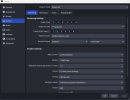
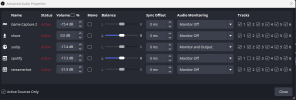
ive not changed anything in the settings- ill attach screenshots of how its configurated

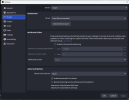
so i dont hwave enhanced broadcasting on, as this can override the audio settings

i save the nr 2 track for VODS, and i use nr 1 track for being live.

spotify runs on track nr 1 for live listening, and unchecked for nr 2, so that it should not get saved to the Vods.

what is going wrong here for this not to work?

it was never an issue before, and i dont understand how i can fix it, as its already set up how its supposed to be?
 

Attachments

  • noenhanced.png
    noenhanced.png
    52.1 KB · Views: 46
  • settingsobs.png
    settingsobs.png
    51.4 KB · Views: 37
  • audioproperties.png
    audioproperties.png
    38.4 KB · Views: 38
I jumped onto your Twitch Channel and looked at your VODs (presuming your forum name matches up with Twitch) and looked at your bitrate output, which shows an average of 7000Kbps... just to confirm are you a Twitch Partner or part of the 2k beta?

Twitch sets a "maximum" bitrate of 6000 Kbps for affiliates and below without Enhanced Broadcasting enabled (plus an additional approx 500Kbps for audio; technically you can push the max to 8000Kbps at most, but issues can arise... see details below) and based on your streaming bitrate in the screenshots, you are well beyond that.

In cases where Twitch detects you exceeding the server allowance, it will throttle you down to compensate for their server and for viewers to more easily see.

My initial guess is that Twitch is detecting the 10,000Kbps and throttling the video and 1st audio track down; while dumping the secondary VOD track in the process.

There may be something else going on here that could be looked into further, but seeing the OBS Logs would help with this:
 
I jumped onto your Twitch Channel and looked at your VODs (presuming your forum name matches up with Twitch) and looked at your bitrate output, which shows an average of 7000Kbps... just to confirm are you a Twitch Partner or part of the 2k beta?

Twitch sets a "maximum" bitrate of 6000 Kbps for affiliates and below without Enhanced Broadcasting enabled (plus an additional approx 500Kbps for audio; technically you can push the max to 8000Kbps at most, but issues can arise... see details below) and based on your streaming bitrate in the screenshots, you are well beyond that.

In cases where Twitch detects you exceeding the server allowance, it will throttle you down to compensate for their server and for viewers to more easily see.

My initial guess is that Twitch is detecting the 10,000Kbps and throttling the video and 1st audio track down; while dumping the secondary VOD track in the process.

There may be something else going on here that could be looked into further, but seeing the OBS Logs would help with this:
im not a partner no, my twitch name is x_meraki_x , not meraki
but i do have it set to 10 000kbps, as otherwise i get error messages when i check the logs in the obs troubleshoot thing, and i was recomended having it that high. iive been streaming with 10 000 for the past year with no issues.
there has never been a issue before with splitting the audio tracks, that started to happen last week after the latest obs update.
its in my streams with blue prince lately that the audio hasnt been split (not that the game is the issue, but its easier to check the problem starts naming the game)
 
I jumped onto your Twitch Channel and looked at your VODs (presuming your forum name matches up with Twitch) and looked at your bitrate output, which shows an average of 7000Kbps... just to confirm are you a Twitch Partner or part of the 2k beta?

Twitch sets a "maximum" bitrate of 6000 Kbps for affiliates and below without Enhanced Broadcasting enabled (plus an additional approx 500Kbps for audio; technically you can push the max to 8000Kbps at most, but issues can arise... see details below) and based on your streaming bitrate in the screenshots, you are well beyond that.

In cases where Twitch detects you exceeding the server allowance, it will throttle you down to compensate for their server and for viewers to more easily see.

My initial guess is that Twitch is detecting the 10,000Kbps and throttling the video and 1st audio track down; while dumping the secondary VOD track in the process.

There may be something else going on here that could be looked into further, but seeing the OBS Logs would help with this:
so i wanted to wait until i had streamed before uplaoding a new log.

ive redone the spotify, to se if that fixed it.this is the log

it has no erros as far as i can tell.

and again, the splitting worked perfectly fine up until the update in obs, ive made no changes here on my end so i really dont know whats causing it

also, you mentioned bitrat in your earlier post, thats the only message im getting ,that my bitrate is to low, but i do have it set to 10000 kbps, and thats what ive been using for the past year with no issues.
 
Back
Top