So when I try to edit OBS studio output files in Adobe Premiere Pro, it becomes an impossible task as it makes Adobe Premiere pro stutter and lag endlessly. This never happened in OBS classic. I've seen several posts of people having similar problems (https://obsproject.com/forum/threads/obs-studio-not-compatible-with-adobe-premiere-pro.43942/) , but with no real resolution.
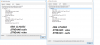
I'm trying to figure out exactly what the differences are between a OBS classic file and a OBS studio file, and I think I have a clue, but I have no idea how to fix it if I am truly on to something. I compared the two in VLC's codec information tool, and when looking at the OBS studio file it has the Video and Audio stream numbers flipped. I submitted an image to show this
could this possibly cause a problem in a video editing software? if so, is there any way I can mux OBS studio to fix this?
I will of course add in my post my obs studio log. Thanks!
https://gist.github.com/d0be0cbe7bc427bc6803aea974ed3722 'current' log file
https://gist.github.com/d2692192c171180ade5a1c5906921ca7 'last' log file'
https://i.imgur.com/TZuPjzO.png (comparison of the VLC codec thing in case upload doesnt work )
I'm trying to figure out exactly what the differences are between a OBS classic file and a OBS studio file, and I think I have a clue, but I have no idea how to fix it if I am truly on to something. I compared the two in VLC's codec information tool, and when looking at the OBS studio file it has the Video and Audio stream numbers flipped. I submitted an image to show this
could this possibly cause a problem in a video editing software? if so, is there any way I can mux OBS studio to fix this?
I will of course add in my post my obs studio log. Thanks!
https://gist.github.com/d0be0cbe7bc427bc6803aea974ed3722 'current' log file
https://gist.github.com/d2692192c171180ade5a1c5906921ca7 'last' log file'
https://i.imgur.com/TZuPjzO.png (comparison of the VLC codec thing in case upload doesnt work )