Question / Help OBS Studio 18.0.1 x64 - scene effect filters NOT WORKING

cheops

New Member
hi everyone!
I´m new to Broadcasting & OBS... - so please forgive my maybe stupid question...

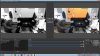
PROBLEM: I want to stream in black&white - so i apply an effect filter (Color correction/desaturate) to the SCENE, which works great, BUT is visible only in the Preview-Window!
The broadcast-/output-window (AND recorded output) is still without the scene filter! (tried "color correction" + "crop/pad" - none shows up in ouput...)

please help!
thanks in advance!

Setup:
* Win7pro_x64
* OBS Studio 18.0.1
* Logitech webcam c930e
 
Thanks for your fast reply!! :-)
here´s the screenshot...


20170418_OBS-Studio_scene_filters_not_working_SCREENSHOT.jpg
 

Attachments

  • 20170418_OBS-Studio_scene_filters_not_working_SCREENSHOT.jpg
    20170418_OBS-Studio_scene_filters_not_working_SCREENSHOT.jpg
    708.3 KB · Views: 28
I´m afraid i´m not confused! already switched scenes - that doesn´t make any difference...
In non-studio mode (classic mode?) the output displays correctly (monochrome - also the recorded file is ok) but as soon as i change to studio mode the live-view is again without the scene-filters (colored)...
 
I´m afraid i´m not confused! already switched scenes - that doesn´t make any difference...
In non-studio mode (classic mode?) the output displays correctly (monochrome - also the recorded file is ok) but as soon as i change to studio mode the live-view is again without the scene-filters (colored)...

Very odd... it's working properly here. Can you grab a log?

upload_2017-4-18_14-11-4.png
 
Code:
19:57:45.503: Warning: The OpenGL renderer is currently in use.  On windows, the OpenGL renderer can decrease capture performance due to the lack of specific features used to maximize capture performance.  The Direct3D 11 renderer is recommended instead.

Well that's problem #1. Change that back to Direct3D 11 and see if it solves this issue.
 
I´m afraid i´m not confused! already switched scenes - that doesn´t make any difference...
In non-studio mode (classic mode?) the output displays correctly (monochrome - also the recorded file is ok) but as soon as i change to studio mode the live-view is again without the scene-filters (colored)...

And what happens when you click Transition?
 
(1) ...nothing happens! (if the same scene remains selected in the scenes-tab) - the live-view is still colored..
(2) ...toggles scenes when another scene is selected (as it should) - live-view remains colored...

( just restarted the machine...no change.. )
 
Back
Top