IosonoOtakuman
New Member
I use the Streamlabs plugin, the Advanced Scene Switcher and the Stream Elements. Sometimes it glitches the screen when I chance the "scene collection" and I had to close it down to fix the issue.
But now, after I installed the last OBS update, the software crashed whenever I try to check for updates, check for integrity or even shut down the sofware.
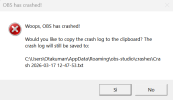
It gives me an alert like the one attached and it won't close. I have to shut it down from task manager to get rid of it.
Any suggestions?
But now, after I installed the last OBS update, the software crashed whenever I try to check for updates, check for integrity or even shut down the sofware.
It gives me an alert like the one attached and it won't close. I have to shut it down from task manager to get rid of it.
Any suggestions?