
obs setting recommendations

7pingu

New Member
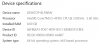
I was wondering if anyone could help me with some settings that could help me get better performance with my videos. I record roblox & minecraft, and my computer is very good at handling those two. But with obs it seems to slow it down a lot, and the fps is horrible when I look at the recording.
 

Attachments

  • e.PNG
    e.PNG
    14.9 KB · Views: 25
Follow the auto config settings

That is an old, low-end CPU, optimized for battery life, not the computationally demanding task of real-time video encoding. Your experience is exactly what I'd expect when asking your laptop to do more than it is capable of

I recommend monitoring hardware resource (CPU, GPU, RAM, Disk I/O, etc) utilization [for ex. using Task manager’s Performance tab and/or Resource Monitor] to see if your system is being maxed out with your settings https://obsproject.com/wiki/General-Performance-and-Encoding-Issues and https://obsproject.com/wiki/GPU-overload-issues
But be realistic. Look for discussions here on settings for an under-powered computer, and expect to have to learn to optimize both your Operating System and OBS to even have a chance of getting something decent working
 
Back
Top