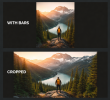
So this may be a long standing problem OR an easy fix (or both)
But I'm having some trouble with the Capture and Record feature for my VR headset
I currently use a WMR Odyssey plus (old headset)
Its resolution is 2880 X 1,600 (1,440 X 1,600 per eye) and it captures perfectly fine.
However, it seems to cut off at the bottom and top of the viewable area, like it can only capture a specific block of the viewing screen
Is this just a limitation of the Hardware itself and that even though I can see it in game i cant capture or display it to OBS in the same way
or is there a setting that I should have set for capturing from the headset or the game.
The game I use the most for this is VRChat
But I'm having some trouble with the Capture and Record feature for my VR headset
I currently use a WMR Odyssey plus (old headset)
Its resolution is 2880 X 1,600 (1,440 X 1,600 per eye) and it captures perfectly fine.
However, it seems to cut off at the bottom and top of the viewable area, like it can only capture a specific block of the viewing screen
Is this just a limitation of the Hardware itself and that even though I can see it in game i cant capture or display it to OBS in the same way
or is there a setting that I should have set for capturing from the headset or the game.
The game I use the most for this is VRChat