Question / Help Obs immediately stops recording and throws error

Pinky

New Member
Everything was working dandy till I updated my amd driver, obs and amf plugin today.

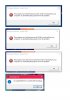
Stops recording immediately in desktop or in game and throws an error, complaining about missing files (avutil-55.dll avformat-57.dll avcodec-57.dll) on 16.11.1 amd driver, obs 0.16.4 and amf 1.4.1.0
Have already uninstalled and reinstalled both packages, didn't fix.

Log file here - https://dl.dropboxusercontent.com/u/42027960/Titanfall/log.txt
 
Can you get a screenshot of the exact error message you're getting?

It appears to be the ffmpeg encoder that's failing, not the VCE plugin.
 
Sure, attached. Any idea why it's suddenly complaining about missing files when previous versions worked ok?
 

Attachments

  • Capture.JPG
    Capture.JPG
    64.5 KB · Views: 69
Yeah, those are all the ffmpeg library DLLs.

I'd give OBS an uninstall/reinstall (all your settings should be fine assuming you choose not to clear them during the uninstall).

Reboot after uninstalling, before reinstalling. Something wonky happened with the OBS update installer, I bet.
 
I checked and despite obs throwing the error about those 3 files, they are indeed installed in this dir:

C:\Program Files (x86)\obs-studio\bin\64bit
 
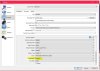
Looks like I have narrowed the issue down. It only occurs if 'use opencl' is 'enabled'. Otherwise recording seems to work fine.

I'll check with Xaymar, though he sent me over here.....
 

Attachments

  • Capture.JPG
    Capture.JPG
    106.8 KB · Views: 58
You still have the same ffmpeg muxer error as before. The encoder started and stopped just fine as is evident from your last log file - make sure to disable any anti-virus solutions that you have installed and try again.
 
Back
Top