

So I have been streaming for only about a week, and every thing has been fairly decent after I have modified settings to get it set up and working. Up until yesterday and today all I streamed was League of Legends and Hearthstone, but I recently have tried to stream Diablo 3. I have set up a scene for Diablo 3, and when I try to preview the stream or go live, the FPS on OBS drops down to 1-8, and the kb/s increases to 3k-8k, or higher. Every other game works fine and sits at 60 FPS and 800-950 kb/s.
While having preview stream or live turned on, OBS itself will also freeze on a regular basis, and often end up not responding, while nothing happens to Diablo 3 itself.
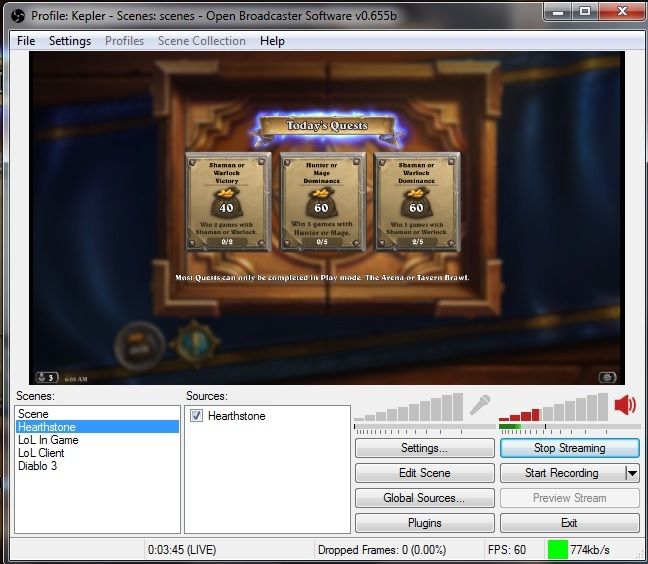
The max bitrate is set at 800 kb/s, and the speed test showed my upload speed at 1,200 kb/s, and the resolution is set at 720. I have tried to modify both of these to see if a difference was made, but OBS still freezes and stops responding when Diablo is playing while OBS is on preview or live. As soon as I close Diablo, OBS behaves normally and does not freeze. I have attached 2 photos of the OBS program running, one with Diablo active, the other with Hearthstone active to show the difference in running FPS and kb/s. You can also see in the picture of OBS with diablo streaming that there is nothing registering on the speakers of OBS, and because I had music playing in the background, you can tell this screenshot was taken while it was currently frozen, but on the Hearthstone screenshot, you can see the sound registering.

I also created a Log File of what happens when Diablo is running, and no clue how to read it myself. Most of the other log files include other games as well because I was doing some testing in FPS and kb/s. To create this Log File I did; Opened D3 -> went into game -> opened OBS, clicked on my Diablo scene then hit Go Live -> opened Diablo back up and played in town for between 5-10 minutes -> Exited Diablo -> hit stop streaming -> exited OBS.
http://pastebin.com/daKCxja6
I would love to stream the new season of Diablo, so any help and ideas on how to resolve this issue is much appreciated. Also, I am not tech savvy enough to know all the information I need to provide to help resolve this issue, so I provided as much as I could think of. If any other information is desired I will gladly post. Thanks for your time and help.
While having preview stream or live turned on, OBS itself will also freeze on a regular basis, and often end up not responding, while nothing happens to Diablo 3 itself.
The max bitrate is set at 800 kb/s, and the speed test showed my upload speed at 1,200 kb/s, and the resolution is set at 720. I have tried to modify both of these to see if a difference was made, but OBS still freezes and stops responding when Diablo is playing while OBS is on preview or live. As soon as I close Diablo, OBS behaves normally and does not freeze. I have attached 2 photos of the OBS program running, one with Diablo active, the other with Hearthstone active to show the difference in running FPS and kb/s. You can also see in the picture of OBS with diablo streaming that there is nothing registering on the speakers of OBS, and because I had music playing in the background, you can tell this screenshot was taken while it was currently frozen, but on the Hearthstone screenshot, you can see the sound registering.


I also created a Log File of what happens when Diablo is running, and no clue how to read it myself. Most of the other log files include other games as well because I was doing some testing in FPS and kb/s. To create this Log File I did; Opened D3 -> went into game -> opened OBS, clicked on my Diablo scene then hit Go Live -> opened Diablo back up and played in town for between 5-10 minutes -> Exited Diablo -> hit stop streaming -> exited OBS.
http://pastebin.com/daKCxja6
I would love to stream the new season of Diablo, so any help and ideas on how to resolve this issue is much appreciated. Also, I am not tech savvy enough to know all the information I need to provide to help resolve this issue, so I provided as much as I could think of. If any other information is desired I will gladly post. Thanks for your time and help.