MrKittensAndGibberish
New Member
I've had no issues up until now using my earbuds as a monitoring device using stereo. It works flawlessly.
Some irrelevant info, I've been having cable issues with my old mic and decided to stop using it, so I switched to my camera mic, it's barely tolerable with filters on and frankly annoying to listen to. So I decided to use my wireless earbuds as microphone instead.
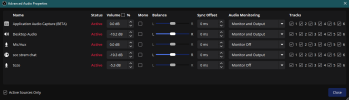
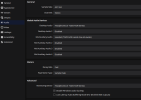
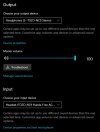
Back to the problem. Now that I'm using my earbuds both as a listening device AND a microphone, OBS refuses to monitor any sound at all through Stereo, but the microphone recording sounds infinitely better than my usb camera. On a side note, I CAN monitor my audio if I have the monitor device set as hands-free as well, but the audio quality is abysmal.
Is this an OBS problem, or is this a problem with my TOZO NC9s just being incapable of using Stereo and the hands-free microphone simultaneously?
Edit:I added the most recent log file.
Some irrelevant info, I've been having cable issues with my old mic and decided to stop using it, so I switched to my camera mic, it's barely tolerable with filters on and frankly annoying to listen to. So I decided to use my wireless earbuds as microphone instead.
Back to the problem. Now that I'm using my earbuds both as a listening device AND a microphone, OBS refuses to monitor any sound at all through Stereo, but the microphone recording sounds infinitely better than my usb camera. On a side note, I CAN monitor my audio if I have the monitor device set as hands-free as well, but the audio quality is abysmal.
Is this an OBS problem, or is this a problem with my TOZO NC9s just being incapable of using Stereo and the hands-free microphone simultaneously?
Edit:I added the most recent log file.