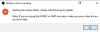
Question / Help Nvidia NVENC encoder error

martin3_3

New Member
Hello, I record Dead by Daylight videos with output setting Encoder: Hardware (NVENC), but every time I restart my computer or don't play the game for couple hours, I won't be able to record with the same setting and It gives me NVIDIA NVENC encoder will not work error. I could change Encoder to Software(x264 low CPU..), but this makes my videos look more laggy. So if I want to get back to my original setting Encoder: Hardware (NVENC), I have to download previous version of Nvidia GeForce Experience, and It's quite annoying to do it 1-3 times per day.
 

Attachments

  • 65f5g4655f4t3.png
    65f5g4655f4t3.png
    5.5 KB · Views: 24
  • 3tf46246g34tfv.png
    3tf46246g34tfv.png
    5.4 KB · Views: 24
Use a search engine to look for "DDU" (Display Driver Uninstaller) from guru3d. Follow this program's intructions to remove all driver files properly then, after your last reboot, install the latest NVIDIA drivers.

If the problem isn't resolved, report back with a log of your latest OBS session.
 
Use a search engine to look for "DDU" (Display Driver Uninstaller) from guru3d. Follow this program's intructions to remove all driver files properly then, after your last reboot, install the latest NVIDIA drivers.

If the problem isn't resolved, report back with a log of your latest OBS session.

That solution worked out completely, thank you so very much.
 
Back
Top