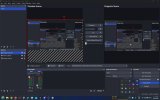
not getting full screen record

philipdk1

New Member
hi i have followed the instructions am only getting a 60% of the width and about 60% of the height, it is like the program has draged the my screen on a 45 degree to the right lower side, i need to send a fault of my game and how it crashes
 

Attachments

  • obs.jpg
    obs.jpg
    344.1 KB · Views: 33
does anyone have any idea how to capture full screen, it is still capturing about 65% of the screen starting from the left hand side of the screen
 
Your display capture is bigger than your canvas, so either size the canvas to fit your display, or resize the display to fit the canvas. Ctrl+F is a shortcut to fit.
 
my display is 2560x1600, i will try what you said but i dont know how to resize because when i tried it got worse
 
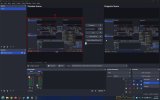
Ctrl+F does nothing, i did look through everything and found canvas and clicked on that and it went worse, but i went display capture properties and unclicked capture cursor and the screen changed, and i recorded full screen but without the cursor, thin i went back in and clicked on it again and nothing except the recording had a cursor so i dont know if i found a bug in the program but it looks like it is working i will try recording what i need and see how it does, will let you know

 

Attachments

  • XQDwSPXZiq.jpg
    XQDwSPXZiq.jpg
    322.6 KB · Views: 23
Back
Top