We are working to get livestream up and running for our church in light of the current COVID-19 situation and restrictions on larger public gatherings.
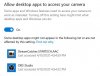
We had the StarTech USB2HDCAP video capture device lying around and I thought I would be able to use it to convert the HDMI feed off of our video camera to USB into the computer and into OBS. I've added a video capture device, go to Properties and choose it from the dropdown menu, but there's just a black screen. I feel like I must be missing something as it seems fairly straightforward. Any thoughts what I'm missing?
We had the StarTech USB2HDCAP video capture device lying around and I thought I would be able to use it to convert the HDMI feed off of our video camera to USB into the computer and into OBS. I've added a video capture device, go to Properties and choose it from the dropdown menu, but there's just a black screen. I feel like I must be missing something as it seems fairly straightforward. Any thoughts what I'm missing?