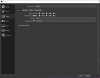
Hi there. I have been having his problem for sometime where OBS does not allow me to stream anymore. I used to be able to, no problem but for some reason, which I believe has to do with NVENC encoders, I cannot. I have learned that there is a drop-down menu in the output section in settings where I should be able to click NVENC H. 24 for my encoders but no matter what it doesn't show up. I have seen tons of people showing their 'logs' but I have no clue what that is or how they can help. Can someone please help me? I miss streaming :(
No NVENC Encoders option for OBS
- Thread starter render
- Start date