Hello everyone!
I've been scouring the internet for the past week trying to find a fix to my issue. I understand at this point its very likely not an OBS issue specifically but Ive been using it for a long time and I know you guys have been developing it with a lot of testing and knowledge of the c985.
So after working fine the night before, the next morning my C985 Live gamer HD stopped capturing audio from the HDMI input and from my PS4. Video works perfectly fine still, just audio is totally dead. And I know the card is fine because I've even removed the card from my PC and put it into another PC and confirmed the HDMI audio capture is working normally.
As best I can tell I think I'm missing the "Avermedia HD" playback device in windows (7)? Honestly I don't recall ever having one, but a lot of my research has led to fixes related to it, and I just don't have one. (Including in the disconnected and disabled devices) Is the Avermedia HD playback device required for OBS to capture HDMI audio from the c985?
I've switched to OBS Studio from classic, updated the c985's firmware, drivers & software to the latest non-beta versions, clean installs of realtek sound and AMD graphics and HD audio drivers and Ive dropped a tech support request with Avermedia and I'm waiting to hear back.
Here's my current OBS log:
https://gist.github.com/500a8b37a67280e079dc7443bb17e58b
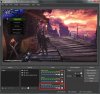
I also attached a pic of my obs screen running with a single video capture device audio bar since it seemed unusual to me. Just in case it helps.
Thanks in advance for the answer to my question and any troubleshooting ideas I can attempt at this point!
-Niric
I've been scouring the internet for the past week trying to find a fix to my issue. I understand at this point its very likely not an OBS issue specifically but Ive been using it for a long time and I know you guys have been developing it with a lot of testing and knowledge of the c985.
So after working fine the night before, the next morning my C985 Live gamer HD stopped capturing audio from the HDMI input and from my PS4. Video works perfectly fine still, just audio is totally dead. And I know the card is fine because I've even removed the card from my PC and put it into another PC and confirmed the HDMI audio capture is working normally.
As best I can tell I think I'm missing the "Avermedia HD" playback device in windows (7)? Honestly I don't recall ever having one, but a lot of my research has led to fixes related to it, and I just don't have one. (Including in the disconnected and disabled devices) Is the Avermedia HD playback device required for OBS to capture HDMI audio from the c985?
I've switched to OBS Studio from classic, updated the c985's firmware, drivers & software to the latest non-beta versions, clean installs of realtek sound and AMD graphics and HD audio drivers and Ive dropped a tech support request with Avermedia and I'm waiting to hear back.
Here's my current OBS log:
https://gist.github.com/500a8b37a67280e079dc7443bb17e58b
I also attached a pic of my obs screen running with a single video capture device audio bar since it seemed unusual to me. Just in case it helps.
Thanks in advance for the answer to my question and any troubleshooting ideas I can attempt at this point!
-Niric