

You are using an out of date browser. It may not display this or other websites correctly.
You should upgrade or use an alternative browser.
You should upgrade or use an alternative browser.
No config URL available for the current service issue
MysticD0nkey
New Member
Im having the same issue and nothing is working

GoreCast
New Member
nevermind solved itI'm getting the same error but the weird things is I can stream to twitch not to kick can anyone advise
ayyeversace
New Member
How did you solve it?nevermind solved it
ayyeversace
New Member
I was able to stream one time to twitch and til tok with the virtual camera. And I went to stream the next day and I keep getting these errors.
I have the Acer Predator Helios Neo 16 with a Nvidia 4060 Graphics Card.
Help?
I have the Acer Predator Helios Neo 16 with a Nvidia 4060 Graphics Card.
Help?
Attachments
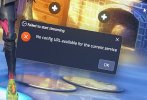
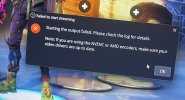
how did u solve it im having the same issuenevermind solved it

keizi
New Member
Or you can install this version https://github.com/obsproject/obs-studio/releases/tag/30.1.2
recklessziggy
New Member
I need help on finding the auto configuration wizard in obs
recklessziggy
New Member
i need your helpI'm getting the same error but the weird things is I can stream to twitch not to kick can anyone advise

PaiSand
Active Member
Tools menu.I need help on finding the auto configuration wizard in obs
You probably need to start here: https://obsproject.com/kb/quick-start-guide
caliber762x39
New Member
Hey there!
Open Settings -> Stream
Then change Service to Twitch
Press: Use key of translation
Then turn off "Use enhanced Broadcasting"
Apply settings
Then open them again and use your service.
Open Settings -> Stream
Then change Service to Twitch
Press: Use key of translation
Then turn off "Use enhanced Broadcasting"
Apply settings
Then open them again and use your service.