

heisnberg00
New Member
Hi everyone,
I have spent many, many hours trying to solve this issue, that i am getting absolutely no audio from my elgato through to OBS.
When I first installed OBS, i used the 64bit version, until i changed to the 32bit version due to some pluggin issues. (i never had an elgato at this time)
Once i had my elgato, i set it up with OBS, followed many video tutorials on how to connect it and set up the settings ect..
However, i can never hear the sound from it when previewing and recording my gameplay.
I have a HDMI going out of my PS4 -> ELGATOHD60 -> PC monitor + usb from elgato to PC
I use Astro A50's Headset on my Ps4 and PC
I also have the PS4 Audio Output Settings set to:
DIGITAL OUT (OPTICAL)
because it is connected to the Astro via optical.
here are the steps ive used:
-Add source
--select video capture device
---select elgato game capture
----The audio input device dropdown menu is un-selectable, but it has (use device audio)
-----If i press the CONFIGURE button, nothing happens... The elgato settings will not pop up.
Just to clarify, if i open the elgato software (Game Capture HD) it WILL play the audio coming from the elgato!!
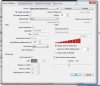
I have attached a pic of my video capture device settings
I have literally googled as much as i can, and have searched everywhere possible.
Here is my most recent preview log:
http://pastebin.com/Sc3WuHcs
Can anyone please help me on this matter?
Thanks alot.
I have spent many, many hours trying to solve this issue, that i am getting absolutely no audio from my elgato through to OBS.
When I first installed OBS, i used the 64bit version, until i changed to the 32bit version due to some pluggin issues. (i never had an elgato at this time)
Once i had my elgato, i set it up with OBS, followed many video tutorials on how to connect it and set up the settings ect..
However, i can never hear the sound from it when previewing and recording my gameplay.
I have a HDMI going out of my PS4 -> ELGATOHD60 -> PC monitor + usb from elgato to PC
I use Astro A50's Headset on my Ps4 and PC
I also have the PS4 Audio Output Settings set to:
DIGITAL OUT (OPTICAL)
because it is connected to the Astro via optical.
here are the steps ive used:
-Add source
--select video capture device
---select elgato game capture
----The audio input device dropdown menu is un-selectable, but it has (use device audio)
-----If i press the CONFIGURE button, nothing happens... The elgato settings will not pop up.
Just to clarify, if i open the elgato software (Game Capture HD) it WILL play the audio coming from the elgato!!
I have attached a pic of my video capture device settings
I have literally googled as much as i can, and have searched everywhere possible.
Here is my most recent preview log:
http://pastebin.com/Sc3WuHcs
Can anyone please help me on this matter?
Thanks alot.
Attachments
Last edited: