Prophit219
New Member
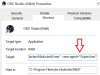
-I've set both OBS and Chrome to open as admin
-I've disabled all extensions in chrome and restarted my system
-I've used another browser in Edge and Explorer
-I've enabled javascript
I still get the “Couldn’t sign you in. You are trying to sign in from a browser or app that doesn’t allow us to keep your account secure. Try using a different browser.” window when I interact.
I've hit the search bar and google and idk if I'm not searching it right but I can't seem to find the answer
-I've disabled all extensions in chrome and restarted my system
-I've used another browser in Edge and Explorer
-I've enabled javascript
I still get the “Couldn’t sign you in. You are trying to sign in from a browser or app that doesn’t allow us to keep your account secure. Try using a different browser.” window when I interact.
I've hit the search bar and google and idk if I'm not searching it right but I can't seem to find the answer