NDI +OBS +Zoom +Mac

wmike

New Member
Hi all,

Getting nowhere fast. Seems very little help anywhere for this sort of stuff.

I am trying to get a number of Zoom participants into individual frames in OBS, for recording and streaming.

NDI, apparently, is the way to do this. However, I can find no directions on how this is achieved; in this forum, NDI or Zoom. Am I the only one baffled by this?

Any help, would be gratefully appreciated. :)
 
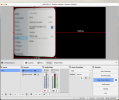
Can you screenshot that? When I do it, it's a perfect copy of what's on the screen.

Actually, I use Jitsi, not Zoom - it's free for unlimited - but that shouldn't make a difference for this.
 
Can you screenshot that? When I do it, it's a perfect copy of what's on the screen.

Actually, I use Jitsi, not Zoom - it's free for unlimited - but that shouldn't make a difference for this.
I forgot to mention, this is on a Macbook Air M1, running MacOs Sonoma. I think, the issue is with Mac and OBS.
 

Attachments

  • Screenshot 2024-07-30 at 10.26.11.png
    Screenshot 2024-07-30 at 10.26.11.png
    225.9 KB · Views: 58
That looks like pointing a cheap webcam at the screen!
If that's what you're doing, you need to use the actual Window Capture source.
If that's what an actual Window Capture does for you, then you've got serious issues! Maybe start a new thread just for that.
 
That looks like pointing a cheap webcam at the screen!
If that's what you're doing, you need to use the actual Window Capture source.
If that's what an actual Window Capture does for you, then you've got serious issues! Maybe start a new thread just for that.
Nope. I am using a Logitech C922 Pro - recording at 1080 HD.
 
Nope. I am using a Logitech C922 Pro - recording at 1080 HD.
I have worked this out, eventually. The issue is as, I suspected, MacOS Sonoma. The Stage Manager feature puts any active screen in a sidebar on the desktop. Nice, but useless when trying to capture a window (the blurred, slanted image is the result).

By, simply, placing the Zoom app in the same window as OBS then capturing the screen and cropping it to the Zoom participant, it does the job. Repeat for each participant. This is a bit clunky but, because there are only 2-3 participants, it works.

Thank you, all for your feedback.
 
The issue is as, I suspected, MacOS Sonoma. The Stage Manager feature puts any active screen in a sidebar on the desktop. Nice, but useless when trying to capture a window (the blurred, slanted image is the result).

By, simply, placing the Zoom app in the same window as OBS then capturing the screen and cropping it to the Zoom participant, it does the job. Repeat for each participant. This is a bit clunky but, because there are only 2-3 participants, it works.
Wow! Glad you figured it out.
 
Back
Top