my obs crashes everytime i open it!!!

lilcejay

New Member
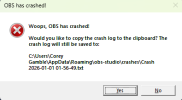
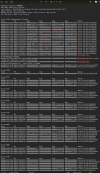
Every time i open my obs it crashes. it says obs wasnt shut down properly and ask if i want to run in safe mode or normal mode, ive tried both and once i click either or it sends that crashing notification. It's been happening for approximately 3 days now. Ive tried alot of things, such as deletingand reinstalling obs multiple times, running obs as administrator, deleting corrupted files, deleting/disabling any plugins, I even went into the windows defender fire wall and its still not work. Sometimes it lets me open but if click setting it shuts down. HELP ME I JUST WANT TO STREAM.!
 

Attachments

  • Screenshot 2026-01-01 020135.png
    Screenshot 2026-01-01 020135.png
    12.1 KB · Views: 36
  • Screenshot 2026-01-01 020350.png
    Screenshot 2026-01-01 020350.png
    211 KB · Views: 44
libcef.dll is used for browser sources and docks. If you're unable to open OBS, try with the --only-bundled-plugins and --safe-mode launch parameters. Remove any browsers sources and docks and disable any plugins. Close OBS and try to open it without those parameters.
 
I'M HAVNIG THE SAME ISSUE AND CAN'T FIND A SOLUTION!! Any news on this?
yeaaaaaaa IT WORK LITERALLY DO WHAT THE MEMBER qhobbes TOLD ME TO DO, i deleted everything but i didnt delete my sources on obs (cam sorce, daw source, display capture source, etc.) just delete all the sources you created on your obs, if you have your obs connected to a outside program ( twitch, youtube, etc.) remove all links and attachments to them, basically just refreshing your obs lol. Let me know if you need more help, i gotcha
 
libcef.dll is used for browser sources and docks. If you're unable to open OBS, try with the --only-bundled-plugins and --safe-mode launch parameters. Remove any browsers sources and docks and disable any plugins. Close OBS and try to open it without those parameters.
i appreciate you man you deserve a million dollars honestly your goated thanks qhobbes
 
Back
Top