Question / Help My logitech webcam c920 won't show a video preview?

Ricardob

New Member
Hi,

I updated the OBS studio and started a stream with no issues.

Second day i open OBS now the video capture is black. I go to settings and I do see the webcam detected. But still no preview. I open and close OBS and sometimes out of nowhere it works.

What is going on I also already opened OBS in admin mode, changed webcam ports???
 
You seem to have added the same device multiple times. A webcam can only be in use by a single application or video capture source at a time, if you want multiple sources of your webcam, add the existing source instead of creating a new one.
 
I also want to add that i downloaded IP webcam to use my google pixel 3 xl as a secondwebcam but once i add a browser source also get a black screen i think that can be found in the logs too.
 
You seem to have added the same device multiple times. A webcam can only be in use by a single application or video capture source at a time, if you want multiple sources of your webcam, add the existing source instead of creating a new one.
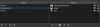
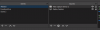
No i havent. Or maybe i dont know what you mean.. ill add a s screen shot Do you mean i did this? I have a scene for ableton this is when i do some other type of streams and ye si have a video capture there and then i have a scene called facebook live and i have a video capture there
 

Attachments

  • Capture.PNG
    Capture.PNG
    7.2 KB · Views: 62
  • Capture1.PNG
    Capture1.PNG
    7.3 KB · Views: 56
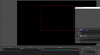
This the screenshot i open on my android IP webcam connected to the WIFI on the band 5. My desktop is connected by ethernet. Then on OBS i have the following
 

Attachments

  • Capture2.PNG
    Capture2.PNG
    34.4 KB · Views: 26
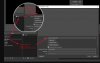
Looking at your capture and capture 1 png even though you named the scenes different you could have loaded up the same C920 webcam. See attached picture example

Two different Scenes with differenct Source names yet duplicating same camera.jpg
 

Attachments

  • Two different Scenes with differenct Source names yet duplicating same camera.jpg
    Two different Scenes with differenct Source names yet duplicating same camera.jpg
    237.2 KB · Views: 22
Two separate sources with the same device will not function. Instead, use the "Add existing" to create a reference to the first source that uses the webcam.

LUFPDUn.png
 
Yes, that is correct your PNG images had different source names and I was just saying you could have used a new C920 rather then the one already in use which would have given you the above gray image I posted.
 
Back
Top