Question / Help My last hope - Dropping Major Frames

MR. S1R

New Member
I've been having this problem for over a year now. I can turn on my stream and it will either work perfectly or drop 30% or more of my frames. This is a day to day thing and I've done everything I can think of to fix it. I have Comcast Blast internet and I've had them come out to my apartment multiple times over the last year. They have replaced the cables and the box outside which everyone is plugged into. They also made sure I was on my own connection. I've tried different streaming apps, but have only streamed to Twitch. I've also changed a lot of the streaming settings and my Twitch server multiple times to test different things out. I really don't know what to do anymore. I have attached one of my last logs so that maybe someone will have an answer. It's a 5-10 minute long test stream. I don't really know what any of this means, but I did notice a problem starting here - 19:47:53.368:
I'm also new to all this forum stuff, so please forgive my ignorance.

Please, if you have a heart, help a struggling lad. Thanks m8s
 

Attachments

And even with all the testing that comcast may or may not have done, there's still every other internet provider between you and twitch where the problem could be. The problem could even be in the interconnect room between comcast and the next ISP over.
 
Yea, I really have no idea what that means lol. Ones of the techs that came out said I picked a horrible place to live...I assume he just meant apartments in general. It used to work perfectly though. I remember going on a trip and when I came back, it was horrible and it's been that way ever since.
 
Looking in your log file, I notice the line that mentions...

19:38:01.807: [rtmp stream: 'simple_stream'] Interface: Killer E2400 Gigabit Ethernet Controller (ethernet, 1000 mbps)

I was building a Ryzen PC recently and one of the things a lot of people warned me against was any of the "Killer" branded Ethernet controllers, as there are weird issues with them, and even weirder issues when trying to remove the "Killer Software Suite" and just run the ethernet via drivers alone.

Not sure if that could be your issues, but with all of the negativity around the "Killer" networking, i figured it would be good to bring up here.

And to add to what Harold was talking about. When you connect to a Twitch ingest server, your data is not going from you to that server, but rather, hopping across multiple other servers in order to get to the Ingest server. For example, when I use the Windows Command Line and enter "tracert obsproject.com", my request hits 13 different servers/networks before finally landing at obsproject.com (the very first server is, in fact, my home router, with the second one being my cable modem, i would assume). The other 11 are different network nodes down the line until it final reaches the OBSProject.com website server.
 
I'll make sure to check that out. I've heard the same thing as well. I accidentally downloaded the suite one time and thought I deleted it. I'll see if I can't remove it for good to see if it changes anything. I appreciate the advice guys.
 
word of warning, there is a forum post on the MSI website (you may not have an MSI motherboard, but it is one of the first pages that comes up when searching for a fix) that some people have been having issues with as well, so take care to read all of the responses to the fix before attempting it yourself.

the forum post in question is here : https://forum-en.msi.com/index.php?topic=178063.0
 
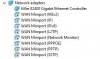
So I looked at how to get rid of the killer suite and realized that I was right. I had already uninstalled it and only reinstalled the drivers. However, when looking in device manager, I noticed that I have a lot of WAN Miniports. I don't know much about this type of stuff, but I don't think it's normal. I didn't want to uninstall them just in case I actually needed them. So what I did was disable them and then tried to stream again. It wasn't perfect, but it was loads better than before. I also checked task manager to look at my ethernet and it was a very pointy graph. I'm not sure if this is normal either. The send and receive kbps would bounce between 3 and 1. Sometimes below 1 and sometimes above 5. I'm including a picture of my Network adapters and another couple of logs to look at. One log is longer where I was continually changing settings. The other log is shorter where I thought I had my settings dialed in. Let me know what you think. I really appreciate you guys.
 

Attachments

  • Capture.JPG
    Capture.JPG
    22.8 KB · Views: 26
  • 2018-02-08 22-13-40.txt
    2018-02-08 22-13-40.txt
    17.6 KB · Views: 20
  • 2018-02-08 21-48-12.txt
    2018-02-08 21-48-12.txt
    49.9 KB · Views: 21
Back
Top