norihiro
Member
norihiro submitted a new resource:
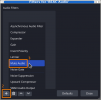
Mute Filter - mute audio of your source
Read more about this resource...
Mute Filter - mute audio of your source
Introduction
This plugin to mute audio of a source.
Even though a user muted a source in the mixer of OBS Studio, the source sometimes triggers OBS Studio to add more audio buffers.
adding 21 milliseconds of audio buffering, total audio buffering is now 85 milliseconds (source: cam3)
It should not cause any problem but it's better to avoid unnecessary process.
Properties
No property is provided.
Read more about this resource...