Question / Help Multiple monitors not showing.

You have one monitor plugged into your integrated GPU (the motherboard), which is the adapter that OBS is using. It cannot see any display connected to any other adapter.

Plug in all monitors directly to your GPU.
 
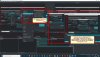
My onboard graphics has 2 x DVI ports I've plugged two monitors into both of the thosse ports and still it only shows up one monitor. The 3rd monitor is Huion Monitor Tablet connected via HDMI to my Additional Graphics card.. I've also treid connecting both monitors to the additional graphics card but that didn't work either. Screenshot attached showin how one option in OBS finds all 3 monitors but display capture only finds one....
 

Attachments

  • QBS monitor issue.jpg
    QBS monitor issue.jpg
    401.5 KB · Views: 110
If you're trying to use display capture to grab the contents of your tablet monitor, then your tablet monitor must be connected to the same display adapter that OBS is running on.
 
If you're trying to use display capture to grab the contents of your tablet monitor, then your tablet monitor must be connected to the same display adapter that OBS is running on.
Thank you for the response and in answer to your question/Query....No. not the tablet monitor, although it would be great if it could,. but I would like to be able to choose between one of my other two monitors which are the name make & Model and My question was/is, "why does my array of monitors not show up in the drop down list for "Display Capture" like it does when choosing "Fullscreen Projector (Preview)""
It just seems a tad strange to me the QBS can detect then in one part of the application but not in others, regardless of which graphic's card they are plugged into...
Jerbear
 
Back
Top