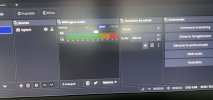
I use OBS 32.2.2 to make videos of me when I sing playing piano with a Roland BK-7m for the rhythms. I use a Scarlett 18 i 16 interface with 4 amplified audio in . The interface is connected to a Mac -mini 4th gen. I use 3 channels on the Scarlett: channel 1 for mic (voice) channel 2 for the piano and channel 3 for the rhythms with BK-7m.
On the OBS mixer, I have 4 tracs . Track 1 matchs with the mic, track 2 with the piano & 3 with the rhythms. The problem is that there is only one volume control for all tracks. The piano sound is clipping.
Is there a way in the settings to control the sound of each individual track ?
Thank you
On the OBS mixer, I have 4 tracs . Track 1 matchs with the mic, track 2 with the piano & 3 with the rhythms. The problem is that there is only one volume control for all tracks. The piano sound is clipping.
Is there a way in the settings to control the sound of each individual track ?
Thank you