This may be a weird and specific problem.
I use a RODE Rodecaster Duo mixer for streaming. Today, a specific USB audio sources started either clipping or showing no volume in OBS. It behaves normally for 2-5 minutes (levels are exactly the same in OBS as they are on the mixer's monitor) and then it suddenly jumps to clipping or stops showing any volume from the source. I do not touch the mixer, anything in OBS or the Windows / EarTrumpet audio settings. It just goes from working to suddenly to not.
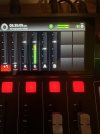
I can re-route the specific audio sources (in this case Google Chrome and Spotify) to the other USB channel and the problem does not occur. It is specific to USB-2 and only in OBS. The Window's Volume Mixer, EarTrumpet and the physical monitor on the Rodecaster ALL show that the audio behaves as expected.
I find it odd that it behaves completely normally for a bit and then jumps to a clipping state, without any adjustment
Here is everything I've tried so far:
- Switching USB-C ports
- Swapping to different USB-C cables (x2)
- Resetting the mixer
- Updating to 32.0.1 (have since downgraded back to 31.1.2 due to plugin incompatibility)
- Reinstalling OBS / trying a portable install
- Reinstalling EarTrumpet
This audio setup is a little convoluted but I'll try to explain how it's set up.
The Rodecaster has two USB-C cables, that go to a single pc. Each cable allows for an individual audio source. I use one for system / game audio and the other for browser source / music (Spotify). There is also a number of virtual audio sources, all of which use EarTrumpet to be routed. This has worked nearly flawlessly for about two years.
I haven't seen any Windows updates that misconfigured audio settings in about a month. I only have the one PC, so I can't test another device to definitively rule out this isn't a hardware issue, but the hardware appears to be working as it always has.
Has anyone else experienced anything like this, especially with a Rodecaster mixer? I'll also be posting in RODE's forum, incase this is specifically a hardware issue.
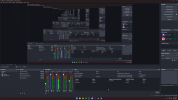
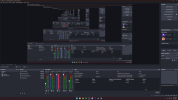
Attached are a couple of screenshots. Apologies for the infinite mirror effect in the OBS preview
I use a RODE Rodecaster Duo mixer for streaming. Today, a specific USB audio sources started either clipping or showing no volume in OBS. It behaves normally for 2-5 minutes (levels are exactly the same in OBS as they are on the mixer's monitor) and then it suddenly jumps to clipping or stops showing any volume from the source. I do not touch the mixer, anything in OBS or the Windows / EarTrumpet audio settings. It just goes from working to suddenly to not.
I can re-route the specific audio sources (in this case Google Chrome and Spotify) to the other USB channel and the problem does not occur. It is specific to USB-2 and only in OBS. The Window's Volume Mixer, EarTrumpet and the physical monitor on the Rodecaster ALL show that the audio behaves as expected.
I find it odd that it behaves completely normally for a bit and then jumps to a clipping state, without any adjustment
Here is everything I've tried so far:
- Switching USB-C ports
- Swapping to different USB-C cables (x2)
- Resetting the mixer
- Updating to 32.0.1 (have since downgraded back to 31.1.2 due to plugin incompatibility)
- Reinstalling OBS / trying a portable install
- Reinstalling EarTrumpet
This audio setup is a little convoluted but I'll try to explain how it's set up.
The Rodecaster has two USB-C cables, that go to a single pc. Each cable allows for an individual audio source. I use one for system / game audio and the other for browser source / music (Spotify). There is also a number of virtual audio sources, all of which use EarTrumpet to be routed. This has worked nearly flawlessly for about two years.
I haven't seen any Windows updates that misconfigured audio settings in about a month. I only have the one PC, so I can't test another device to definitively rule out this isn't a hardware issue, but the hardware appears to be working as it always has.
Has anyone else experienced anything like this, especially with a Rodecaster mixer? I'll also be posting in RODE's forum, incase this is specifically a hardware issue.
Attached are a couple of screenshots. Apologies for the infinite mirror effect in the OBS preview