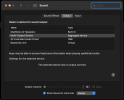
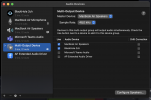
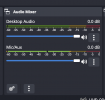
M mrbartuss New Member Oct 3, 2022 #1 Hi. What else do I have to change to record desktop audio? Unfortunately it seems the mixer doesn't detect the sound. Attachments Screen Shot 2022-10-03 at 14.29.39.png 170.3 KB · Views: 69 Screen Shot 2022-10-03 at 14.30.04.png 236.2 KB · Views: 63 Screen Shot 2022-10-03 at 14.30.17.png 41.1 KB · Views: 65 Screen Shot 2022-10-03 at 14.30.41.png 293.5 KB · Views: 63
Hi. What else do I have to change to record desktop audio? Unfortunately it seems the mixer doesn't detect the sound.
B Babs Johnson Member Nov 16, 2022 #2 May I start by advising you to change your sample rate to 44100kHz. I would disable desktop audio and add an audio capture source.
May I start by advising you to change your sample rate to 44100kHz. I would disable desktop audio and add an audio capture source.
M mrbartuss New Member Nov 16, 2022 #3 Babs Johnson said: May I start by advising you to change your sample rate to 44100kHz. I would disable desktop audio and add an audio capture source. Click to expand... How can i disable it? It seems I can only hide it
Babs Johnson said: May I start by advising you to change your sample rate to 44100kHz. I would disable desktop audio and add an audio capture source. Click to expand... How can i disable it? It seems I can only hide it
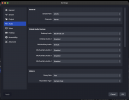
B Babs Johnson Member Nov 16, 2022 #4 mrbartuss said: How can i disable it? It seems I can only hide it Click to expand... You can disable it in OBS settings audio tab.
mrbartuss said: How can i disable it? It seems I can only hide it Click to expand... You can disable it in OBS settings audio tab.