Lumetric Corrector

Lumetric Corrector 2.2.0

Success! 2.0.0. works in intel Mac OS Ventura! Woohoo! However, the download came in as as copy of the last one, so I changed the number, so I could recognize it. Also praying you have updated Vignetter to work in Mac also. Thanks so much!
 
Success! 2.0.0. works in intel Mac OS Ventura! Woohoo! However, the download came in as as copy of the last one, so I changed the number, so I could recognize it. Also praying you have updated Vignetter to work in Mac also. Thanks so much!
working on the vignetter! No problem :)
 
TheGeekFreaks updated Lumetric Corrector with a new update entry:

Lumetric Corrector 2.2.0 - LUT export + MASK

## [2.2.0] - 2025-06-26

### Added
- Mask selection tool with shapes
- **Cross-platform LUT Export**: Native file dialog for selecting LUT export location
- Support for both Windows and macOS file systems
- File extension validation and auto-completion
- Default path to user's Documents folder

### Fixed
- **Critical Mask Rendering Bug**: Fixed black screen issue when using mask
- Corrected vector type mismatch (vec4 → vec2) for mask position and size
- Added safety clamps to...

Read the rest of this update entry...
 
Request to add a masking feature to the shader, similar to professional color grading nodes. In some scenarios, we need to fine-tune colors for specific areas rather than globally. The current version 1.3.1 does not support this, and to achieve such effects requires manually drawing a PNG mask, which is not very flexible. I hope a feature similar to advanced masking can be added.THX~

is implemented now!
 
is implemented now!
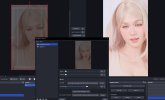
Thanks, I have tried it, and the mask works on my computer. But the default parameters in the mask can be slightly modified. Set mask X and mask Y to 0.5 to center the mask in the image, and set mask width to 0.2 and mask height to 0.1, so that after opening the mask, We can immediately identify where the mask is, which is convenient for adjustment.
 

Attachments

  • 29.JPG
    29.JPG
    261.2 KB · Views: 151
In my current script usage, I've encountered a bug: when a source is loaded with a filter registered by a Lua script, the preview on the main canvas and filter settings page displays correctly. However, when projecting this scene onto another monitor, the displayed content is noticeably incorrect; the image is severely washed out, seemingly due to an incorrect EOTF gamma curve setting. I've reproduced this issue 100% on multiple computers. So, how can this be resolved? Add a color correction filter below the source's Lumetric Corrector. Then, without needing to configure anything, the projected image will be correct.
 
Back
Top