Low bit rate

ChanceA

New Member

Despite my internet having an upload speed over 900 Mbps, my bit rate when streaming is really low, ranging from ~150-1500 kbps. About 2 weeks ago it started where when I start a stream the bit rate is low, but unplugging the ethernet cable from the computer and plugging it back in would bring the bit rate up. Now the bit rate will not improve no matter what I do.
 
1. Killer's Software Suite is known for its poor performance and issues when trying to stream. Please download the package from the vendor's page , completely uninstall all Killer NIC items and run the installer, choosing to only install the Hardware Drivers.
2. The Hardware-accelerated GPU scheduling ("HAGS") feature in Windows is currently known to cause performance and capture issues with OBS, games and overlay tools. It's an experimental feature and we recommend disabling it via these instructions.
3. OBS is not running as Administrator. This can lead to OBS not being able to Game Capture certain games. If you are not running into issues, you can ignore this, but it looks like you are because you have Window Capture titled 'Game'.
4. Your log contains streaming sessions with dropped frames. This can only be caused by a failure in your internet connection or your networking hardware. It is not caused by OBS, but OBS can help. Before you start streaming, go to Settings, Advanced, Network, enable Dynamically change bitrate... [Apply], [OK]. Find the best server using

If still having issues, follow the troubleshooting steps at: Dropped Frames and General Connection Issues.

 
1. Killer's Software Suite is known for its poor performance and issues when trying to stream. Please download the package from the vendor's page , completely uninstall all Killer NIC items and run the installer, choosing to only install the Hardware Drivers.
2. The Hardware-accelerated GPU scheduling ("HAGS") feature in Windows is currently known to cause performance and capture issues with OBS, games and overlay tools. It's an experimental feature and we recommend disabling it via these instructions.
3. OBS is not running as Administrator. This can lead to OBS not being able to Game Capture certain games. If you are not running into issues, you can ignore this, but it looks like you are because you have Window Capture titled 'Game'.
4. Your log contains streaming sessions with dropped frames. This can only be caused by a failure in your internet connection or your networking hardware. It is not caused by OBS, but OBS can help. Before you start streaming, go to Settings, Advanced, Network, enable Dynamically change bitrate... [Apply], [OK]. Find the best server using

If still having issues, follow the troubleshooting steps at: Dropped Frames and General Connection Issues.
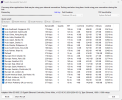
Hi, when I used the Twitch Test program all of the listed servers returned with a Quality score of 0. What do you recommend doing about this?
 

Attachments

  • Screenshot (14).png
    Screenshot (14).png
    64.9 KB · Views: 38
Back
Top