

where am I? I had a techie who got me up and running but when I returned without him to help I found myself here. I had obs running a year ago and whenever I opened it up it was always running but not this time. Can you tell where I am and what I need to KICKstart this?
You are using an out of date browser. It may not display this or other websites correctly.
You should upgrade or use an alternative browser.
You should upgrade or use an alternative browser.
lost @ 71year old
- Thread starter pntrmarc
- Start date
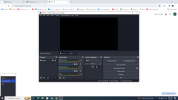
From what i can pick up from the screen shot, it looks like you are wanting to live stream a camera called logitec. Make sure your logitec camera is plugged in first. Then open OBS. If you still dont have a picture of your camera on the black preview screen. Then where you see the words "logitec" under sources on the left hand side, right click it and from that menu select "properties". Where it says "Device" click the dropdown menu and find your logitec camera. Hopefully you should then see a image from the camera appear. Press OK at the bottom when done. This should at least get you to the stage of having an image from the camera. Next step it to connect to where ever you stream such as youtube.
From what i can pick up from the screen shot, it looks like you are wanting to live stream a camera called logitec. Make sure your logitec camera is plugged in first. Then open OBS. If you still dont have a picture of your camera on the black preview screen. Then where you see the words "logitec" under sources on the left hand side, right click it and from that menu select "properties". Where it says "Device" click the dropdown menu and find your logitec camera. Hopefully you should then see a image from the camera appear. P
No picture. Everything's plugged in. Have no idea but I thank you for your kind considerationFrom what i can pick up from the screen shot, it looks like you are wanting to live stream a camera called logitec. Make sure your logitec camera is plugged in first. Then open OBS. If you still dont have a picture of your camera on the black preview screen. Then where you see the words "logitec" under sources on the left hand side, right click it and from that menu select "properties". Where it says "Device" click the dropdown menu and find your logitec camera. Hopefully you should then see a image from the camera appear. Press OK at the bottom when done. This should at least get you to the stage of having an image from the camera. Next step it to connect to where ever you stream such as youtube.
ress OK at the bottom when done. This should at least get you to the stage of having an image from the camera. Next step it to connect to where ever you stream such as youtube.
this should be an easy fix.
The first step, we need to make sure your camera is actually connected and detected by your windows computer.
So turn up your speakers, and unplug and re-plug in your camera to your computer. I am assuming it is a standard usb camera. When you plug it in you should hear a bleep sound from your computer to let you know it has detected it. If your camera has a light on it, it may light up. You might also see a quick message appear in the bottom right hand corner of your screen telling you a usb device has been plugged in. You can always try different USB ports on your computer.
Next you need to check OBS has access to the camera.
On your windows desktop in the bottom left corner, there is a search bar, type "settings" and go to the settings panel.
Then click on "Privacy" (its near the bottom right).
Then down the left hand side menu, you will see "Camera", click it.
On this panel, you will need to allow your computer and OBS to access your camera, so switch on any options that allow OBS to access your camera. Such as:
"allow access to the camera on this device" make sure its "on".
"allow apps to access your camera" make sure its "on"
"allow desktop apps to access your camera" make sure its "on"
If you see OBS here make sure it has been given access to the camera.
That is it. Your camera should now be detectable in OBS.
So as i said in the first post;
now open up OBS. (If it was already open when you did the change, close it, and open it back up.)
Right click on your source that says "logitec" and click "properties" from the menu.
Where it says "device" click the dropdown menu and find your usb camera. You should then see a picture appear from the camera. Press okay and you should have a video feed from your camera in obs.
If you tried all this and you cant find your camera, try a different usb port on your computer.
good luck
The first step, we need to make sure your camera is actually connected and detected by your windows computer.
So turn up your speakers, and unplug and re-plug in your camera to your computer. I am assuming it is a standard usb camera. When you plug it in you should hear a bleep sound from your computer to let you know it has detected it. If your camera has a light on it, it may light up. You might also see a quick message appear in the bottom right hand corner of your screen telling you a usb device has been plugged in. You can always try different USB ports on your computer.
Next you need to check OBS has access to the camera.
On your windows desktop in the bottom left corner, there is a search bar, type "settings" and go to the settings panel.
Then click on "Privacy" (its near the bottom right).
Then down the left hand side menu, you will see "Camera", click it.
On this panel, you will need to allow your computer and OBS to access your camera, so switch on any options that allow OBS to access your camera. Such as:
"allow access to the camera on this device" make sure its "on".
"allow apps to access your camera" make sure its "on"
"allow desktop apps to access your camera" make sure its "on"
If you see OBS here make sure it has been given access to the camera.
That is it. Your camera should now be detectable in OBS.
So as i said in the first post;
now open up OBS. (If it was already open when you did the change, close it, and open it back up.)
Right click on your source that says "logitec" and click "properties" from the menu.
Where it says "device" click the dropdown menu and find your usb camera. You should then see a picture appear from the camera. Press okay and you should have a video feed from your camera in obs.
If you tried all this and you cant find your camera, try a different usb port on your computer.
good luck